

Common Events and Elements Of Trolley and Checkout Flow
Overview
This document provides a summary of the popups used in the trolley feature and outlines the common events of add to trolley and checkout completion irrespective of the channel.
Common Modal Names and Purpose:
TsModalProductVariants(opens on clicking Variants option present directly on the product card or from within Add To Trolley Modal)TsModalTrolleyMultipleItemsConfirmation(static modal displayed after item(s) has been added to trolley)TsModalAddToTrolley(opens on clickingAdd To Cartbutton on product listing card)TsModalNearbyStockFinder(opens to search stock levels in all stores from within Add To Trolley Modal or directly from PDP)
Product Cards
Occurences:
- Product Listing Page (PLP)
- Monetate Recommendations Carousel
- Builder Carousels
- Order Again
- Order History Listing
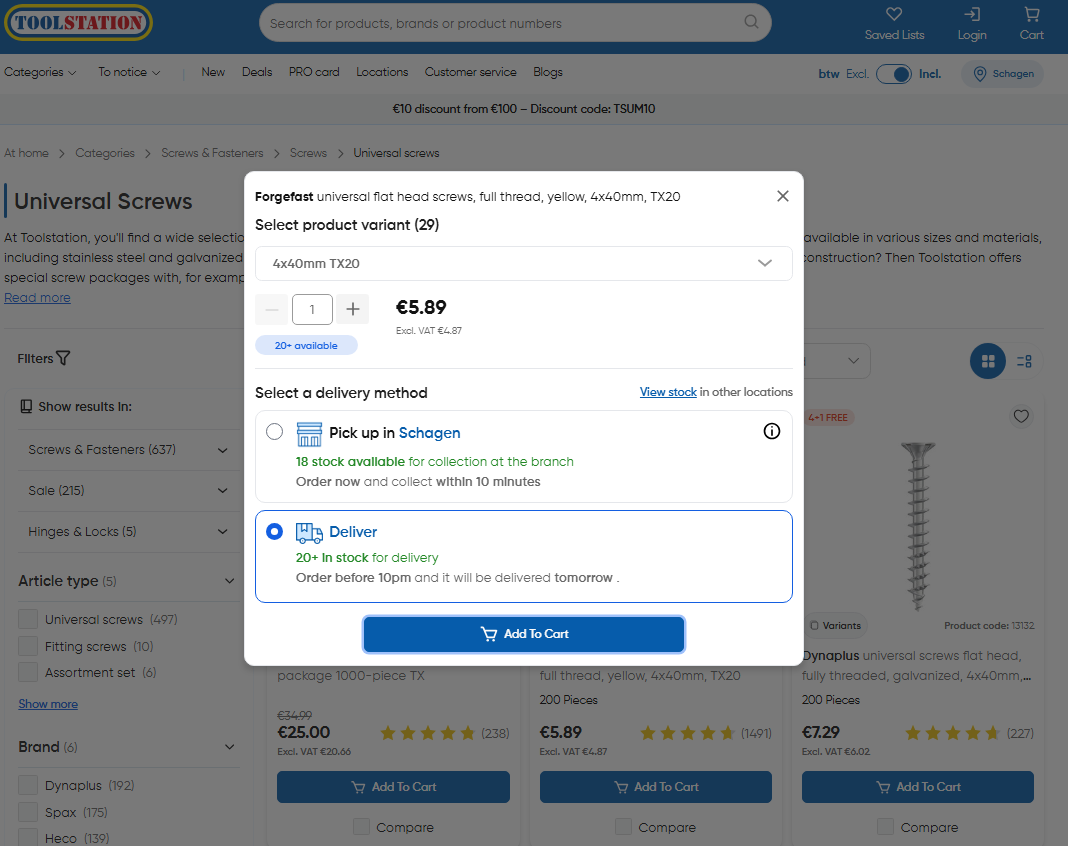
On clicking add to trolley on product card, generic add to trolley modal TsModalAddToTrolley.vue is opened which contains options
to add the item into desired channel
- State that guides add to trolley modal visibility:
trolleyStore.preview_overlay_visible
Note: Since these generic modals may be required in multiple dynamic pages, the controlling states are kept in store and the template of these components are embedded in
layouts>TsProductActions.vue
Common Actions + States:
- When user clicks on Add To Trolley CTA on any product card on the site, following method is called which is responsible for fetching product details and stock data for the specific item
- After fetching the data,
stock availability is injectedinto the product response and default channel (deliveryorcollection) is set based on the stock availability - Skeleton loader is shown inside the modal while the above API calls are in progress
// ~/components/organisms/TsCardProduct.vue

async function openAddToTrolleyDialog(itemToAdd: Product) {
  trolleyStore.preview_overlay_visible = true;

  // 1. Reset the initial quantity
  trolleyStore.previewed_product_selected_quantity = 1;

  trolleyStore.previewed_product = itemToAdd;
  // 2. Inject the stock details for the product
  const [productWithStock] = await stockStore.getStockForProducts([
    itemToAdd.code,
  ]);
  trolleyStore.previewed_product = productWithStock;

  // 3. Show collection status (out of stock / next day collection / available)
  trolleyStore.collection_availability =
    await trolleyStore.evaluateCollectionAvailability(
      trolleyStore.previewed_product
    );

  const { outOfStockForCollection, outOfStockForDelivery } =
    trolleyStore.previewed_product;

  // 4. Set default channel (delivery / collection) based on stock availability
  if (!outOfStockForCollection && isBranchSet && outOfStockForDelivery)
    trolleyStore.previewed_product_selected_channel = TrolleyChannel.Collection;
  else if (!outOfStockForDelivery)
    trolleyStore.previewed_product_selected_channel = TrolleyChannel.Delivery;
  else trolleyStore.previewed_product_selected_channel = null;
}
Dispatch To Trolley Method
// ~/stores-datalayer/trolley.datalayer.ts
export async function dispatchItemToTrolley(
  product_code: string,
  quantity = 1,
  channel = TrolleyChannel.Delivery,
  delivery_method_code = DeliveryMethodCodes.Delivery
) {
  /* 1. Create a new trolley if doesn't exist on the client */
  if (!trolleyStore.trolley_id) await createTrolley();

  /* 2. If the product already exists in trolley then update it */
  const existingTrolleyLineItem = trolleyStore.all_trolley_line_items.find(
    (line) => line.product_code === product_code
  );

  if (existingTrolleyLineItem) {
    await updateExistingTrolleyItem(existingTrolleyLineItem, {
      quantity,
      channel,
      delivery_method_code,
    });
    return;
  }

  /* 3. API - Create a new trolley line item */
  const item: TrolleyLineRequest = {
    product_code,
    quantity,
    channel,
    delivery_method_code,
  };

  const { data: trolleyData } = await EcomTrolleyService.addToTrolley(
    trolleyStore.trolley_id,
    item,
    trolleyStore.trolley_session_token
  );

  /* 4. Create trolley line items data structure */
  // Map { Delivery: LineItem[], Collection: LineItem[], NextDayCollection: LineItem[], DirectShip: LineItem[] }
  await setTrolleyLineItems(trolleyData);

  const lineAdded = trolleyStore.all_trolley_line_items.find(
    (line) => line.product_code === product_code
  );

  if (!lineAdded) return false;

  /* 5. Fire GTM and other tracking events with new trolley line data */
  postAddToTrolley(lineAdded);
}
Core Methods:
- Refer This API Documentation For Add To Trolley
- Refer This API Documentation For Updating An Existing Item In Trolley
Core Resource Schema:
Trolley Line Items
The trolley_line_items data structure is defined as a RefinedTrolleyLineItems type, which is a record of TrolleyLineItem arrays, keyed by TrolleyChannel values (excluding SameDayDelivery).
// ~/types/ecom/trolley/trolley.type.ts
export type RefinedTrolleyLineItems = Record<
  keyof typeof TrolleyChannel,
  TrolleyLineItem[]
>;

// ~/stores/trolley.store.ts
export const useTrolleyStore = defineStore("trolleyStore", {
  state: () => ({
    trolley_line_items: {} as RefinedTrolleyLineItems,
    // ...other states
  }),
});
Typically, the trolley_line_items object is structured as follows which is looped over to display
items in /trolley and /checkout pages.
{
  Delivery: TrolleyLineItem[],
  Collection: TrolleyLineItem[],
  NextDayCollection: TrolleyLineItem[],
  Directship: TrolleyLineItem[],
}
Each TrolleyLineItem object contains information about a specific product in the trolley, including product_code, quantity, and channel.
Referenced Types
The following types are referenced in this documentation:
TrolleyLineItem: defined intypes/ecom/trolley/trolley.type.tsTrolleyChannel: defined intypes/ecom/trolley/trolley-map.tsProduct: defined intypes/ecom/product/product.type.ts
PDP
On the details page, the add to trolley CTAs are present right on the page.
There are different CTAs for "Delivery" / "Directship" & "Collection" / "NextDayCollection" allowing the user to choose delivery channel seamlessly. Like,
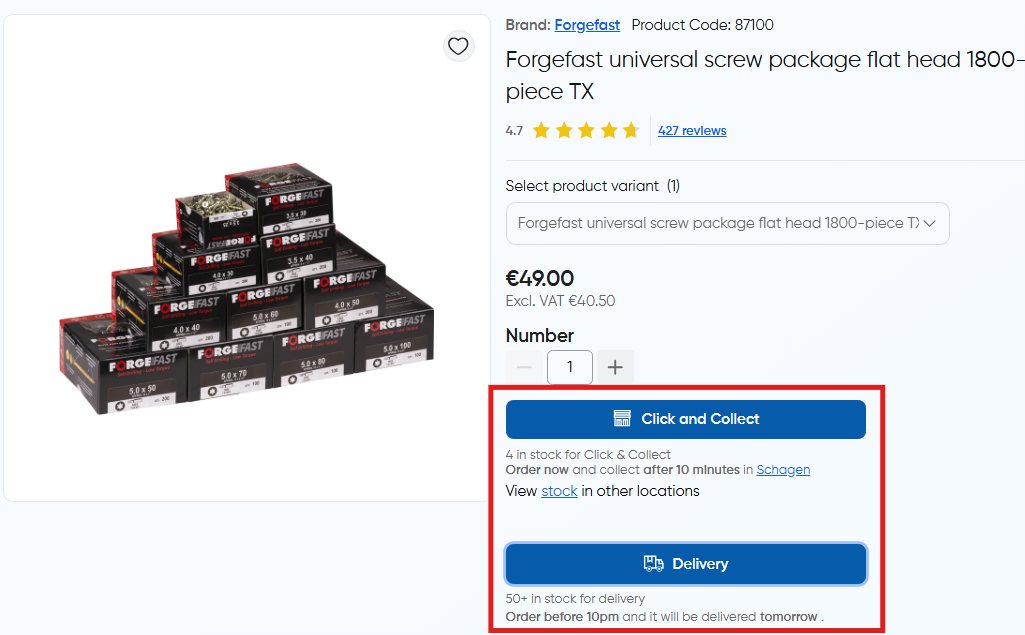
Note: In out of stock case, "Notify" button is shown if product.allow_stock_notifications is true in the response otherwise CTA is disabled.
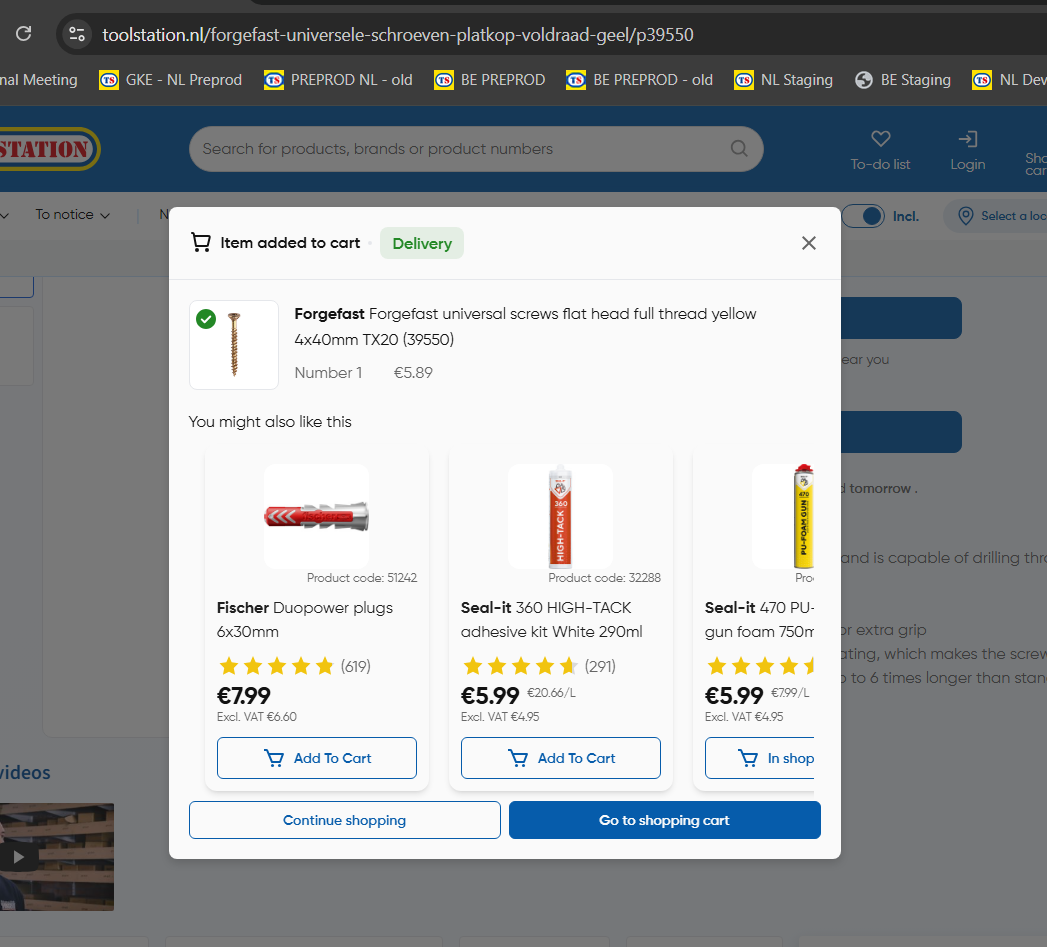
After a product is added, confirmation popup is displayed which shows monetate recommendations as per items in trolley.
Trolley Delivery Method Codes
The following structure maps the logical delivery methods to the actual codes used in the ECOM API.
export enum DeliveryMethodCodes {
  Delivery = "00004",
  DeliveryUnder = "00005",
  SameDayDelivery = "00035",
  Collection = "00006",
  NextDayCollection = "00037",
  Directship = "00033",
}
Order Place
Typically create order request strategy is as follows:
- Braintree authorization request is triggered to
/payments/client-token/{customerId}to retrieve the client token for the customer which marks the initialization of the checkout session - Trolley Details + Address Information + Payment Token are sent to
/ordersendpoint to place the order. On successful completion, it generated an order ID and marks the trolley status as "ordered" (2)
- Endpoint: POST
/orders - API Docs: https://toolstation-devportal.apigee.io/docs/ecom-api-non-prod/1/routes/orders/post
- Request:
// ~/types/ecom/order.type.ts
type CreateOrderRequest = {
  trolley_id: string;
  payment_method: string; // "braintree" or "trade-credit
  payment_type: string; // braintree-ideal, braintree-google-pay, braintree-paypal-normal, braintree-card, braintree-apple-pay, braintree-paypal-credit
  payment_nonce: string; // client token received from Braintree
  payment_device_data?: string; // device data generated by Braintree SDK
  order_total: string;
  billing_address_id: string;
  delivery_address_id?: string;
  next_day_collection_address_id?: string;
  collection_address_id?: string;
  po_number?: string; // For PRO-CARD orders
  promotions?: TrolleyDiscountResponse; // promotions if applied
};
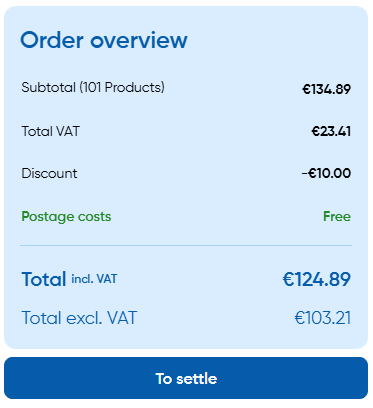
Trolley and Checkout Order Summary
NL:
BE:
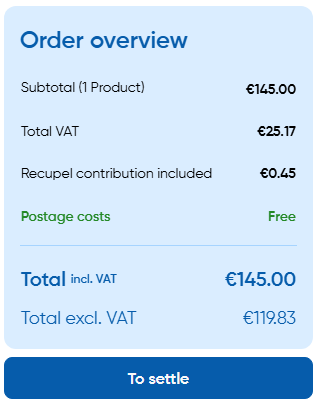
- Order summary is rendered based on the response from
/order-totalsendpoint. - Endpoint - GET
trolleys/{trolleyId}/order-totals
// sample response
{
  items: {
    inc_vat: {
      raw: 145,
      formatted: "€ 145,00",
    },
    ex_vat: {
      raw: 119.83,
      formatted: "€ 119,83",
    },
    vat: {
      raw: 25.17,
      formatted: "€ 25,17",
    },
  },
  delivery: {
    inc_vat: {
      raw: 0,
      formatted: "€ 0,00",
    },
    ex_vat: {
      raw: 0,
      formatted: "€ 0,00",
    },
    vat: {
      raw: 0,
      formatted: "€ 0,00",
    },
  },
  totals: {
    inc_vat: {
      raw: 145,
      formatted: "€ 145,00",
    },
    ex_vat: {
      raw: 119.83,
      formatted: "€ 119,83",
    },
    vat: {
      raw: 25.17,
      formatted: "€ 25,17",
    },
  },
  subtotals: {
    inc_vat: {
      raw: 145,
      formatted: "€ 145,00",
    },
    ex_vat: {
      raw: 119.83,
      formatted: "€ 119,83",
    },
    vat: {
      raw: 25.17,
      formatted: "€ 25,17",
    },
  },
  // BE Region Specific Contributions
  bebat: {
    inc_vat: {
      raw: 0,
      formatted: "€ 0,00",
    },
    ex_vat: {
      raw: 0,
      formatted: "€ 0,00",
    },
    vat: {
      raw: 0,
      formatted: "€ 0,00",
    },
  },
  recupel: {
    inc_vat: {
      raw: 0.45,
      formatted: "€ 0,45",
    },
    ex_vat: {
      raw: 0,
      formatted: "€ 0,00",
    },
    vat: {
      raw: 0,
      formatted: "€ 0,00",
    },
  },
}