Models
Introduction
A model is a paradigm—a pattern for something else. Builder offers three kinds of models that define content types:
- A Page model: The basis for a full Page built in Builder.
- A Section model: The basis for a part of a Page.
- A Data model: Gives structure to a collection of data that you render as you choose.
You use these models as the defining source for content entries. By using models in Builder you can define what a Page, Section, or collection of Data is and use those models over and over to build your site and populate it with content. And you can create as many models as you like.
All models in Builder support:
- A/B Testing: Test different versions of your content.
- Targeting: Deliver specific content to the right people.
- Scheduling: Publish your content at the right time.
- Roles and Permissions in a Space: Admins and Developers can edit models by default, but you can also specify permissions by content model using Custom Roles.
This means that you can granularly grant permissions, test, and precisely deliver content.
Using models to build your app
When you use models to build your app, you can create exactly the Pages, Sections, and Data specific to your use case with your integrated App.
Examples of models include:
- A seasonal announcement banner placed on a page between certain dates.
- Marketing tile targeting a specific persona on certain pages.
- Blog authors whose profiles you want to link to from different parts of your site.
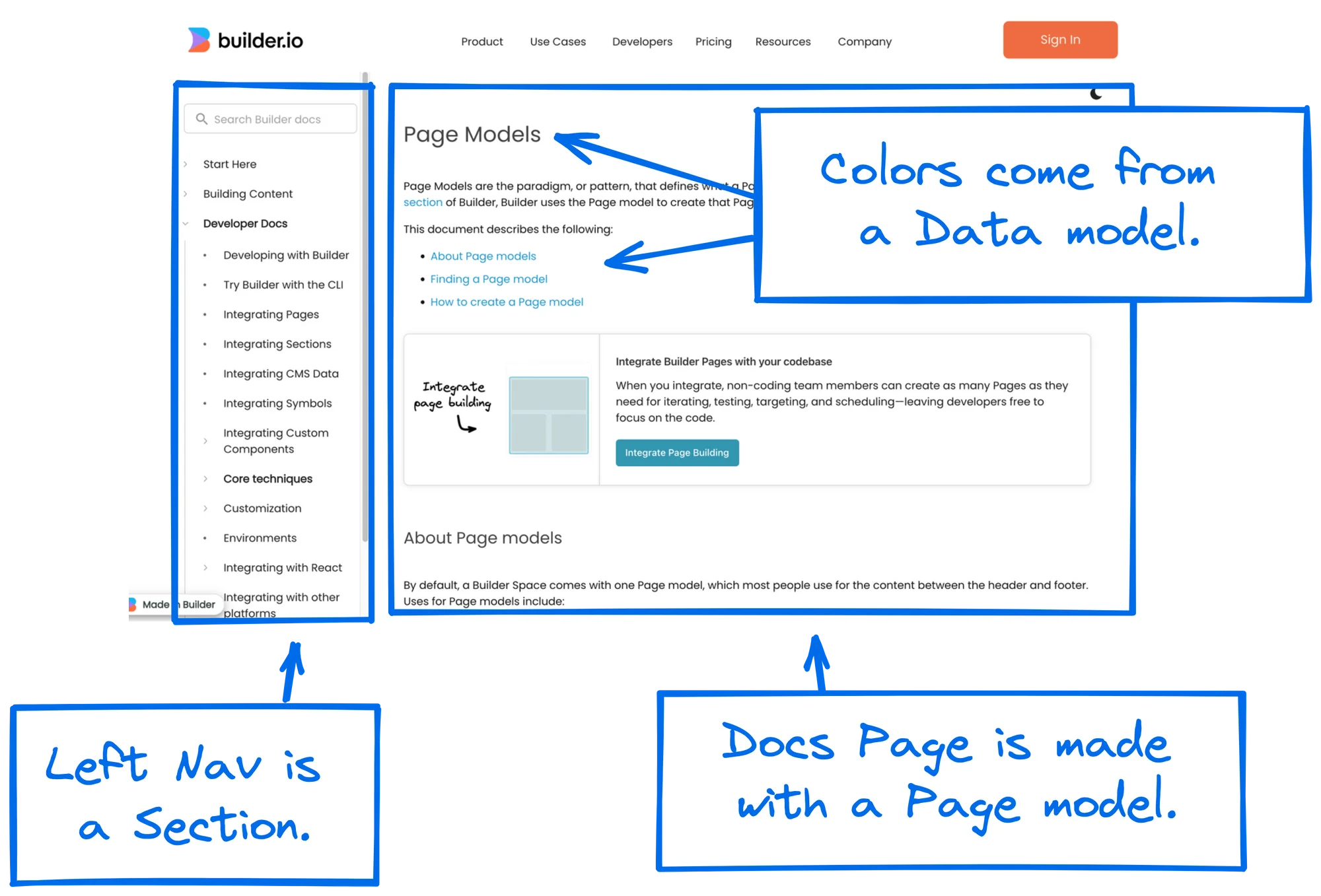
The following diagram shows a typical Builder documentation page. The left side navigation is a Section, the body of the document is a Page, and the font colors are stored in a Data content entry.
Architecture Best Practices
To build your site most efficiently, use this guide's best practices for:
- Structuring your integrated app
- Deciding what goes into Builder and what stays in your code
Using Builder with your site
You can decide which parts of your site Builder manages and which parts you want to maintain in code. There are three main ways you can incorporate Builder:
- Visual pages: Use the drag-and-drop UI to develop everything between your site's header and footer.
- Visual sections: Make just a part of a page visually editable in Builder and use targeting and scheduling to decide who sees what.
- Structured data: Fetch data from Builder and use it anywhere in your application, such as menu items.
Visual Pages
Try out Pages
Use Pages to manage entire pages, such as:
- Marketing and content pages
- Landing pages

Visual Sections
Try out Sections
Use Sections to maintain parts of your site or app, such as:
- Announcement bars
- Product editorial
- Collection heroes
- Cart upsells

Structured Data
Try out Data
Use Structured Data to manage structured data, such as:
- Navigation links
- Product details
- Blog post authors
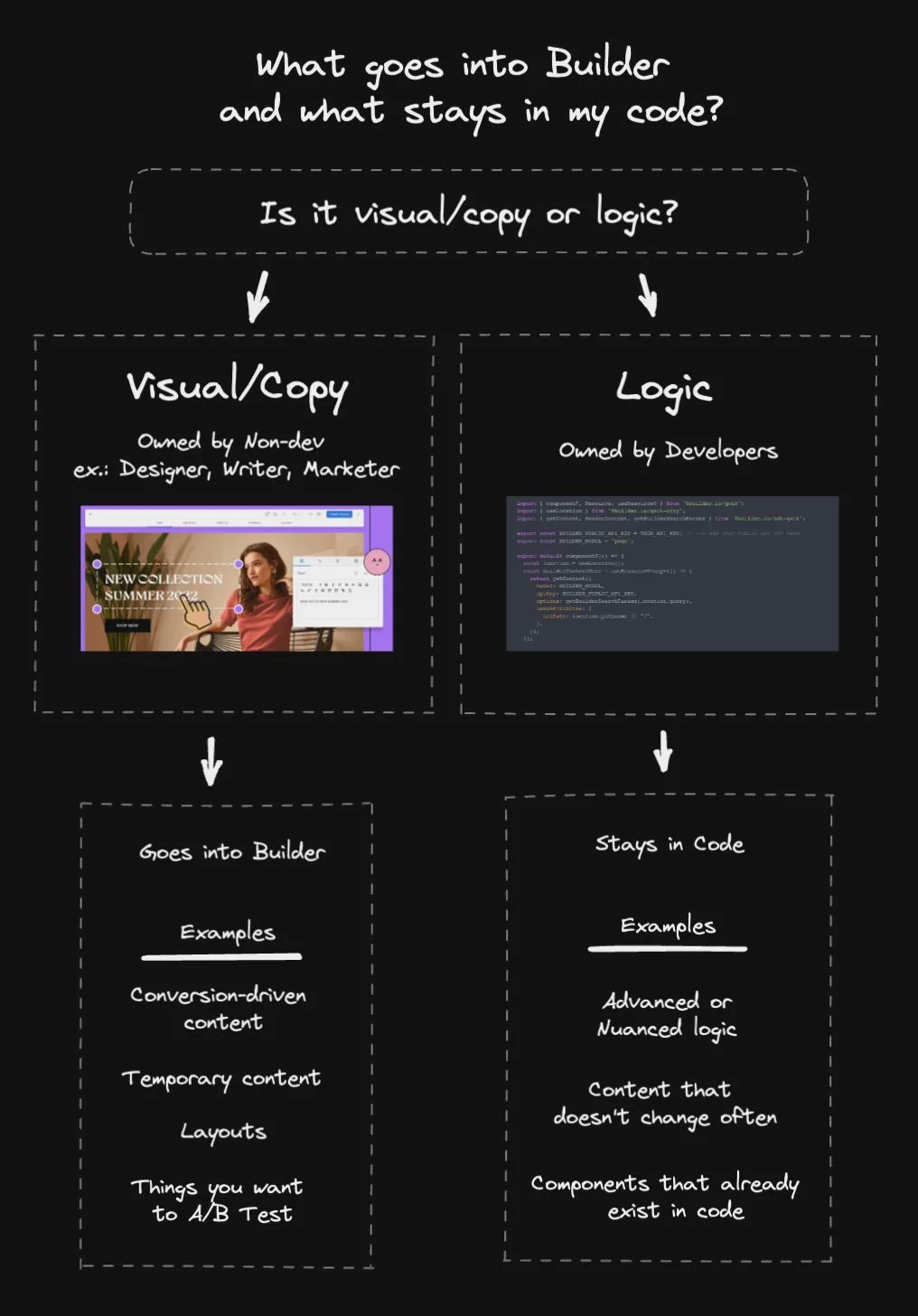
Deciding what goes into Builder
When deciding what goes into Builder and what stays in code, consider these points.
Keep it in Builder if:
- A non-developer maintains it
- Content is conversion-driven
- Involves repeated iteration
- Contains ephemeral content
- Features layouts; regular and A/B testing layouts
Keep it in code if:
- A developer maintains it
- Involves nuanced logic
- Is static, unchanging data
- Contains content that doesn't change often
- Consists of components that already exist in code
The following tree shows this same decision-making process for determining what goes into Builder and what stays in code: