

Faceted/Filtered Search With Algolia
Algolia also serves a purpose beyond just providing autocomplete suggestions. Though the underlying theory remains the same, we request Algolia with a search query and Algolia in return sends matching product objects with their details.
Overview
Algolia also serves a purpose beyond just providing autocomplete suggestions. Though the underlying theory remains the same, we request Algolia with a search query and Algolia in return sends matching product objects with their details.
For autocomplete suggestions, we request 3 or 5 suggestions in the response; depending on what the marketing and the product teams decide upon.
The key point to note here is that, if we can request 3-5 products; we can request 24 or 30 product suggestions as well and instead of showing the results as auto complete suggestions; we parse the results and show them in card format.
This is our PLP or Product Listing Page!
But any PLP on an ecommerce site site is incomplete without the Filters.
What are Filters?
The best way to understand what filters are is by taking an example from an existing site, we'll consider Amazon.
In the below image, when I search for "phone" on Amazon, in the left panel I see what are called "Filters".
Filters help the end user to narrow down on exactly what they're looking for.
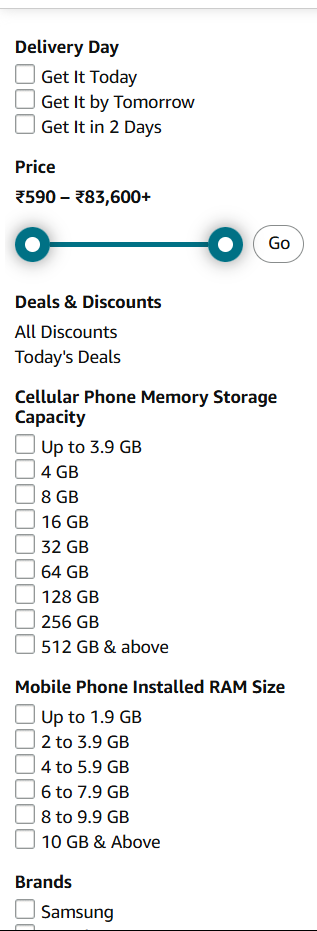
Let's say I want a phone that I can have delivered to me by today, so check that first option in the Delivery Day category, the moment I check that box the page refreshes and I see new data on the page.
All the products that I will see now are the ones, which, if I order any one of them, will be delivered to me by today itself.
Interestingly enough, you will also notice that the filters on the left hand side have changed too!
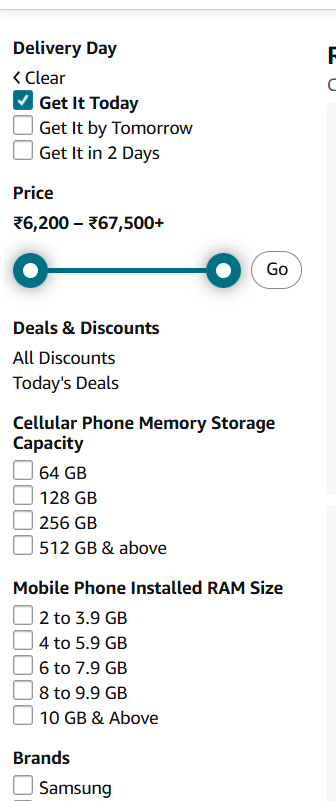
Earlier we had so many options for memory storage capacity and installed RAM size but after we selected the filter Get It Today, the filters were updated as well. But why were the filters updated?
Let's understand.

Now, lets consider the case where the user might wanna narrow down on his search and be more specific about what he is looking for.
Let us assume that the user narrows down on his search like the following:
- type is phone
- RAM should be at least 12gb
Let's see what happens when the user updates his search query.

Here, to add onto the explanation - we can see that it included the phone with 16gb of RAM as well, that is because our query was "at least 12gb"; which implies that the minimum requirement for RAM is 12gb, but anything above it also welcomed.
The relation between Filters and Products
There exists a relationship between filters and different products. Like mentioned at the start, when we select a filter on Amazon - the page show a preloader and new set of products is now visible, but the filters are updated as well and this lead to the question why are these filters updated?
It is important to understand this so as to know how and why it was implemented in our product.
When our search query has additional information to narrow down search result, that additional information becomes our "filter".
Let's take another example:
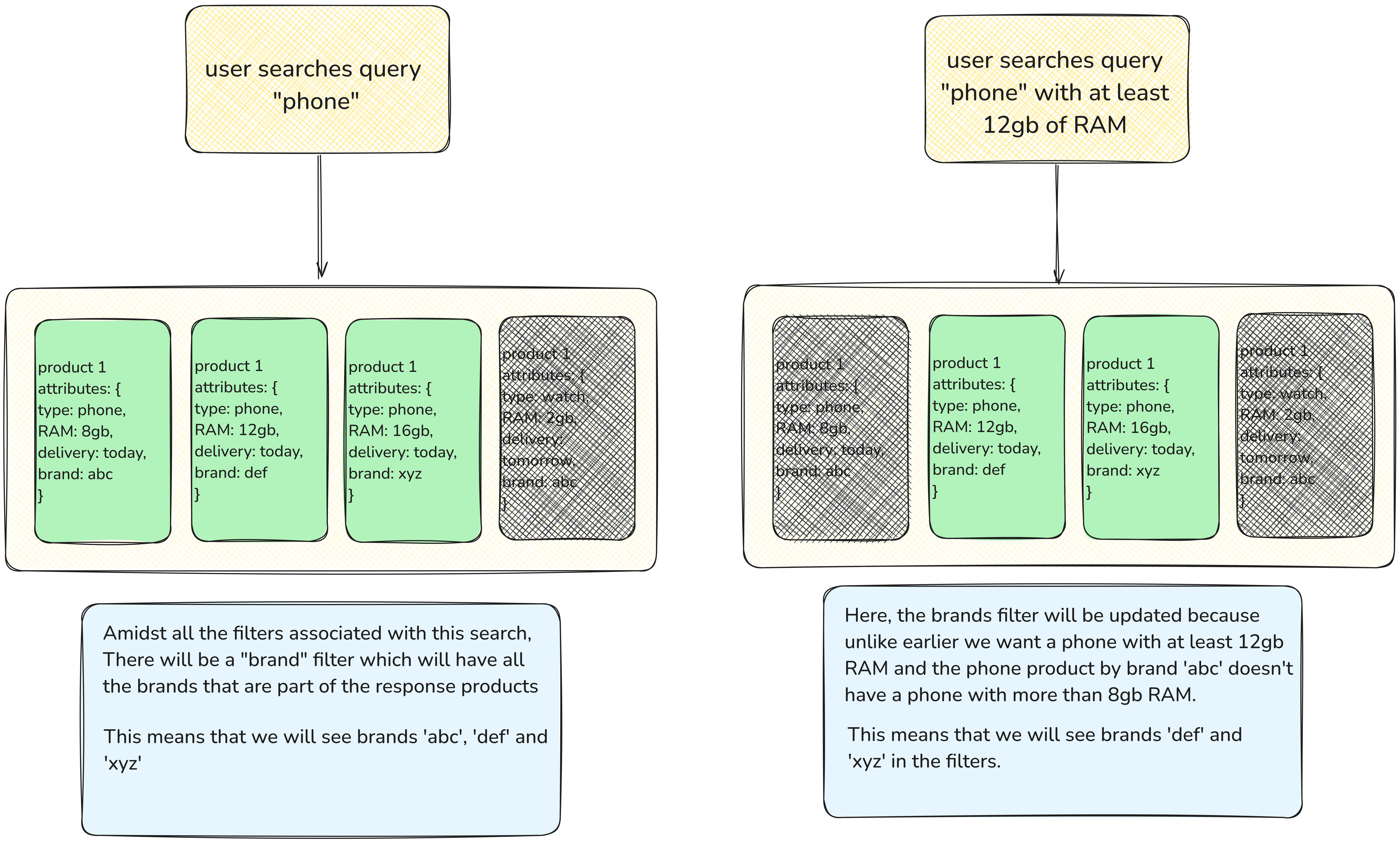
Hence, the product attributes define what filters we will recieve in every consecutive filter update based on our search query. Every filter update - affects rest of the filters; like we saw in the example above.
Technical Aspect of Filters
In Algolia, we don't filter things based on search query alone.
Search query serves the purpose of defining what you are looking for, but it you wish to narrow down further on your search like the Amazon example, Algolia has broadly two types of filters.
These are passed as a functional arguments to Algolia when we make a request to Algolia using their composable method.
async getProductDetailsOnEnter(
        keyword: string,
        requestOptions?: AlgoliaRequestOptions,
        searchIndex?: string,

    ): Promise<ProductDetails> {
        try {
            /**
             * Getting data from Algolia
             */
            const { search, result } = useAlgoliaSearch(searchIndex);
            await search({
                query: keyword,
                requestOptions: requestOptions,
            });

            const results = result.value;

            /**
             * Extract product_ids from the response
             */
            const productIDs = this.extractProductIds(result.value.hits);

            /**
             * Extract filters from the response
             */
            const filters = this.extractFilters(results);

            /**
             * Extract total number of results
             */
            const nbHits = this.extractNbHits(results);


            const nbPages = this.extractNbPages(results);

            const page = this.extractPage(results);

            const offset = this.extractOffset(results);


            return {
                productIDs,
                filters,
                nbHits,
                nbPages,
                page,
                offset
            }


        } catch (error: any) {
            /**
             * Handle Algolia error here
             */
            useErrorHandler(error, "low");
            throw error; // Optionally rethrow the error for handling in components or higher-level functions
        }
    }
This is the method that we use to actually make requests to Algolia.
It exists in the algolia.service.ts file.
We will focus on just one functional parameter which is requestOptions of type AlgoliaRequestOptions.
The type AlgoliaRequestOptions is provided to us by Algolia Nuxt Module itself.
requestOptions is an object and has plenty of options that we can pass or change for our deesired results, but we use the following primarily:
{
    hitsPerPage: number, // number of results we want per search request
    cacheable: false, // whether we want to cache the results or not
    minWordSizefor1Typo: 3, // minimum amounts of words before we start considering a typo
    facets: TsProvidedFacetFilters, // What all filters do we want to include in out search (if available)
    facetFilters: brandName, // Based on what value do we want to filter the facets that we have requested
    filters: dealsCategory // more flexible filters
},
Filters
Description: filters allow you to apply custom boolean expressions for filtering search results.
Syntax: Uses logical operators (AND, OR, NOT) to combine conditions.
Flexibility: Highly flexible as it supports complex logical combinations.
Use Case: When you need advanced filtering that involves numerical ranges or non-faceted attributes.
FacetFilters
Description: facetFilters are specifically for filtering based on facets, which are pre-defined attributes in the Algolia index used for faceted search.
Syntax: Organized as arrays of arrays, where inner arrays represent OR conditions, and the outer array represents AND conditions.
Flexibility: Simpler than filters and restricted to facets.
Use Case: When filtering by facets like categories, brands, or other pre-defined, faceted attributes.
Key differences between Filters and FacetFilters
| Feature | Filters | FacetFilters |
|---|---|---|
| Complexity | Can handle complex logical conditions | Simple filtering limited to facets |
| Data Scope | Works with any attribute, not just facets | Works only with facet-enabled attributes |
| Syntax | Boolean expressions with logical operators | Nested arrays representing AND/OR logic |
| Use Case | Advanced and flexible filtering needs | Facet-specific, simpler filtering |
| Performance | May be slower for complex queries | Optimized for facets, generally faster |
TsProvidedFacetFilters
There are many FacetFilters that are associated with a product based on it's type, category etc. but it is not necessary for us to:
- Request all the associated FacetFilters, this only increases the size of each payload.
- Adds additional overhead around hiding and dealing with filters in the UI.
- Final point is that - we simply don't need them.
Though we can query FacetFilters and request all of them at once using (*) as the argument but we do not; we request only the ones we need, and if that FacetFilter is not associated with that particular search - it won't come in the response.
Format
FacetFilters can be parsed in the following format:
facetFilters: [
  'attribute:value', // (single string)

  // attribute1:value AND attribute2:value (multiple strings)
  'attribute1:value', 'attribute2:value'

  // attribute1:value OR attribute2:value (multiple strings within an array)
  ['attribute1:value', 'attribute2:value'],

  // (attribute1:value OR attribute2:value) AND attribute3:value (combined strings and arrays)
  ['attribute1:value', 'attribute2:value'], 'attribute3:value',

  ...
]