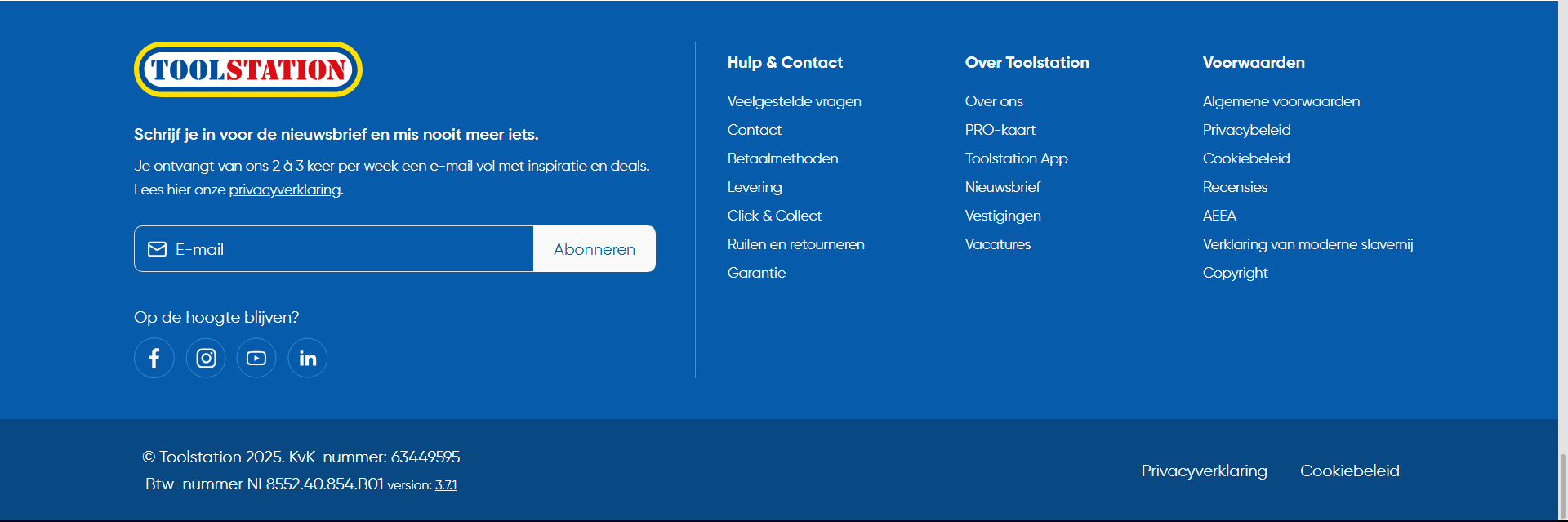
Eu24 Web
Footer
Description
This footer component is a dynamic and responsive Vue.js component designed for Toolstation's website. It contains multiple sections such as newsletter subscription, call-to-action (CTA) cards, secure payment options, footer links, and social media links. The component adapts its layout and content based on the screen size (mobile, tablet, and desktop).
FEATURE
1. Newsletter Section
- Displays a newsletter subscription form on mobile view.
- Heading and description are translated using the useTranslation composable.
- Responsive design: Hidden on desktop and shown on mobile and tablet.
2. Call-to-Action (CTA) Card
- A promotional card to encourage users to download the app with a special discount.
- Displayed in the footer, with translation support.
3. Payment Options
- Displays icons for supported payment methods (e.g., Apple Pay, PayPal, Visa, etc.).
- Only shown on desktop versions.
4. Social Media Links
- Provides social media links (e.g., Facebook, Instagram, YouTube) for both mobile and desktop views.
- Each link has an associated icon that is displayed in the respective screen view.
- Tracks clicks on social media links for analytics purposes.
5. Footer Links
- Dynamically loads footer links from a backend service (via the footerStore).
- Displays them in collapsible accordion panels on mobile and as regular links on desktop.
6. Version and Legal Information
- Displays the Toolstation version number and other legal information, including the Chamber of Commerce and VAT numbers.
- Provides links to privacy policy and cookie policy pages.
7. Observer for Analytics
- Uses the Intersection Observer API to log analytics when the footer becomes visible to the user. This tracks engagement with the footer section.
Sections Breakdown
- Mobile Device
- Logo: Includes a clickable Toolstation logo, visible on desktops.
- Payment Options: Displays a list of available payment methods (Apple Pay, PayPal, Visa, etc.).
- Footer Links: Displays footer links as simple navigation.
- Social Media Links: Displays a different set of social media links tailored for desktop views.
- Desktop Version
- Logo: Includes a clickable Toolstation logo, visible on desktops.
- Payment Options: Displays a list of available payment methods (Apple Pay, PayPal, Visa, etc.).
- Footer Links: Displays footer links as simple navigation.
- Social Media Links: Displays a different set of social media links tailored for desktop views.
Analytics and Event Tracking
- This component contains multiple event tracking implementations:
- Footer Logo Clicks: Tracks clicks on the footer logo.
- Social Media Clicks: Tracks clicks on social media links.
- Footer Link Clicks: Tracks clicks on footer navigation links.
const handleLogEvent = (FooterData: any) => {
  logEvent({
    options: {
      eventAction: 'click',
      eventProperties: {
        name: FooterData.name,
        url: FooterData.url,
      },
      eventInteraction: true,
      eventLabel: FooterData.name,
      eventName: 'footer_link_clicks',
    },
  });
};
2. Future Improvements
- Add More Payment Options: Extend the payment options to include more global payment methods.
- Localization: Enhance localization support for footer links and dynamic content.
- Accessibility: Improve accessibility for screen readers and ensure all dynamic content is fully accessible.
Component Used
| Component | Description |
|---|---|
TsNewsletter | Mobile and desktop layouts to allow users to subscribe to the newsletter. |
TsCardCta | Desktop layout to encourage users to download the app and get a discount. |
TsRow | To structure the footer content, making it responsive and organized. |
TsColumn | To divide the footer content into different sections such as social media, payment options, and footer links. |
TsImage | For displaying the Toolstation logo, social media icons, and payment options. |
TsDivider | To visually separate content in the desktop view. |
TsTypography | To display translations, legal information, and other text content in the footer. |
TsAccordion | To display footer links in a collapsible format on mobile devices. |
TsAccordionTab | To display each group of footer links in the accordion. |
NuxtLink and NuxtLinkWithLocale | To display each group of footer links in the accordion. |
FLOW SUMMARY
Component Initialization
- Footer Component Loads: When the page is loaded, the footer component is initialized.
- UUID Generation: A random ID is generated for the footer element using the useRandomUUID() composable.
- Device Detection: The component detects whether the user is on a desktop or mobile/tablet device using useDevice().
Dynamic Content Rendering
Mobile View:
- Newsletter Section: A responsive newsletter form is displayed on mobile devices.
- Social Media Links: Mobile-specific social media icons and links are shown (Facebook, Instagram, etc.).
- Footer Links Accordion: A collapsible accordion is rendered to show footer links for mobile devices.
Desktop View:
- Logo: The Toolstation logo is displayed as a clickable link.
- Payment Options: A list of payment methods (e.g., PayPal, Visa, MasterCard) is shown in the footer.
- Footer Links: A structured, non-collapsible list of footer navigation links is displayed for desktop users.
- Social Media Links: A different set of social media icons is shown for desktop users (Instagram, Facebook, YouTube, etc.).
Translation of Content
- Dynamic Translation: All content, including headings and descriptions, is translated using the
useTranslationcomposable. For example: useTranslation('newsletterDescription', 'Schrijf je in voor de nieuwsbrief...')- Translations are used for all user-facing text in the footer.
Event Handling for Interactions
- Logo Click Event: When the footer logo is clicked, an event is logged to track user interaction with the logo:
logEvent({ eventAction: "click", eventLabel: "Footer Logo Clicked" })
- Social Media Link Click Event: Each social media link (e.g., Facebook, Instagram) is tracked when clicked:
logEvent({ eventAction: "click", eventLabel: "Social Media Link Clicked", eventProperties: { link: media.link, name: media.name } })
- Footer Link Click Event: When any footer navigation link is clicked, the link is logged for tracking:
logEvent({ eventAction: "click", eventLabel: FooterData.name })