

Algolia Store Methods
Overview
This section covers every relevant method/function that is currently part of the Algolia flow and is being used in the product for any usecase.
initialize()
Parameters
None
Return
void
Syntax
initialize() {
    this.algolia = new AlgoliaService();
}
Description
Initializes an algolia object of AlgoliaService as a state in the store. Only this object is supposed to be used throughtout the lifecycle to make access methods inside the AlgoliaService. This might appear as a singleton but it is not, since we are allowing potential reinitialization of the of the object in cases when the object is null.
Use Case
Originally, this method was being called in the app.vue file, at starting of our app's lifecycle; but this approach was causing problems with ssr.
During ssr; it was unable to declare and define a store state - so this initialization was dropped.
You are not supposed to call this method at any point, yourself or manually.
Every method in algoliaStore checks for algolia state object for null.
If it is null, it initializes a new object and from that point onwards that object is used throughout the lifecycle.
getAlgoliaSuggestions()
Parameters
| Name | Type | Description |
|---|---|---|
| searchKeyword | string | searchKeyword entered by the user in the search bar |
Return
Promise<void>
Syntax
async getAlgoliaSuggestions(searchKeyword: string) {
    this.lastTypedKeyword = searchKeyword;

    if (!this.isDebounced) {
        setTimeout(() => {
            this.isDebounced = true;
            this.getSuggestionsFromAlgolia(this.lastTypedKeyword);
        }, 650);
    }
},
Description
This method is called whenever the emit input is triggered in the component <TsAutoCompleteAlgolia />.

This method acts as a wrapper over getSuggestionsFromAlgolia(). The primary purpose of this method is to debounce the function calls. This method, as of 6 November, 2024 debounces for 650ms.
It takes one functional parameter, that is searchKeyword of type string. The value of this parameter is returned to us by the emit input of the
We also update the value of a store state variabl called lastTypedKeyword.
this.lastTypedKeyword = searchKeyword;
We maintain a state of the last keyword that was typed by the user in the search bar. Now, since this method is called whenever the emit input is fired; our local state lastTypedKeyword is updated as well to the value recieved as the parameter from the emit.
<TsAutoCompleteAlgolia
    @input="(keyword : string) => algoliaStore.getAlgoliaSuggestions(keyword)"
/>
For debouncing, we maintain a store state called isDebounced. By default, the value of this state is false the contents inside the if block are only triggered when isDebounced is false. Now, once we're inside the if block; we are setting the value of this state to true. This essentially blocks off any other call to this function from the stack for the next 650ms.
Ideally, we are supposed to set it back to false after our operation is complete and we do the same too, but we update the value of isDebounced in chained method getSuggestionsFromAlgolia() that we call inside the if-block.
Use Case
API call to Algolia to get the suggestions doesn't happen in this method.
This method only updates the state of lastTypedKeyword and debounces the function call.
This method is called only to fetch debounced suggestion results for the AutoComplete component.
getSuggestionsFromAlgolia()
Parameters
searchKeyword: string
| Name | Type | Description |
|---|---|---|
| searchKeyword | string | searchKeyword entered by the user in the search bar |
Return
Promise<void>
Syntax
async getSuggestionsFromAlgolia(searchKeyword: string) {
    if (!searchKeyword.trim()) {
        useStateModifier(this.algoliaState, 'idle', 'Idle');
        this.isDebounced = false;
        return; // Early exit if searchKeyword is empty or whitespace
    }


    useStateModifier(this.algoliaState, 'loading', 'Loading..');
    if (this.algolia) {
        await this.algolia.getSuggestions(
            searchKeyword,
            {
                hitsPerPage: 3
            },
            this.currentActiveIndex
        )
        .then((response) => {
            this.algoliaResponse = response;

            if (this.algoliaResponse.length > 0) {
                useStateModifier(this.algoliaState, 'success', 'Results Found');
            } else {
                useStateModifier(this.algoliaState, 'failed', 'No results found');
            }
        })
        .catch((error: any) => {
            useErrorHandler(error);
            let errorMsg = "Unable to load results, try again..."
            if (useOnline()) {
                errorMsg = "No internet connection"
            }

            useStateModifier(this.algoliaState, 'failed', errorMsg);
        })
        .finally(() => {
            this.isDebounced = false;
        });
    }
},
Description
The getSuggestionsFromAlgolia method fetches search suggestions from an Algolia instance based on a provided search keyword. This method performs debounced, asynchronous calls to Algolia to retrieve relevant suggestions, updating the application’s state based on the results. It handles various outcomes, including successful data retrieval, no results found, and potential errors (like connectivity issues).
Use Case
This method is not exlpicitly called from any other file or component. Only getAlgoliaSuggestions()
- Empty Keyword Handling: If the searchKeyword is empty or contains only whitespace. The method sets the Algolia state to 'idle' and exits early without making an API call.
- State Management: Uses useStateModifier to update the Algolia state to 'loading' while waiting for results, then to 'success' or 'failed' based on whether results are found.Response Handling: On a successful response:
- If results are found, sets the state to 'success'.
- If no results are found, sets the state to 'failed' with a message.
- Error Handling: If an error occurs: - Uses useErrorHandler to manage the error. - Checks for internet connectivity; if offline, updates the state with a no-connection message, otherwise displays a generic error message.
- Cleanup: Resets the isDebounced flag after completion to allow subsequent searches.
redirectOnEnterClick()
Parameters
| Name | Type | Description |
|---|---|---|
| searchKeyword | string | searchKeyword entered by the user in the search bar |
Return
Promise<void>
Syntax
async redirectOnEnterClick(keyword: string) {
    this.lastTypedKeyword = this.lastSearchedKeyword = keyword;
    this.saveSearchHistoryItem();
    let parse_int = parseInt(keyword);

    if (keyword.length === parse_int.toString().length &&
        keyword.length === 5 && this.algoliaResponse.length === 3) {

        let item: any = useRootStore().findInArrayByKey(this.algoliaResponse[2], 'productCode', keyword);

        if (item) {
            navigateTo('/product/' + item.slug + '-' + parse_int)
            return;
        }
    }

    const localePath = useLocalePath();
    navigateTo({
        path: localePath('/search'),
        query: {
            q: keyword
        }
    });
},
Description
The redirectOnEnterClick method is triggered when a user presses "Enter" after typing a search keyword. It handles navigation based on the keyword entered.
The method first updates the search history, then checks if the keyword is a 5-digit number, and if it matches a specific product code in the Algolia search results. If a match is found, it redirects to the product page. Otherwise, it redirects to a search results page with the keyword as a query parameter.
deleteSearchHistoryItem()
Parameters
| Name | Type | Description |
|---|---|---|
| optionToDelete | object/any | This is the object of the item we wish to delete from the search history |
Return
Promise<void>
Syntax
delteSearchHistoryItem(optionToDelete: options) {
    const index = this.searchHistory.findIndex(
        (history: { name: string | null; }) => history.name === optionToDelete.name
    );
    if (index !== -1) {
        this.searchHistory.splice(index, 1);
    }
},
Description
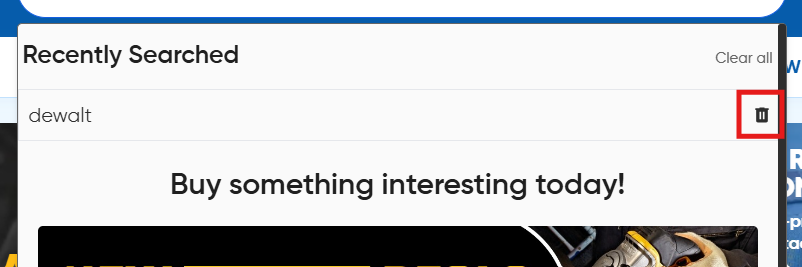
The deleteSearchHistoryItem method removes a specific item from the user's search history based on the name provided in optionToDelete. If a match is found, it deletes the corresponding entry from the searchHistory array. The search history exists as a local store state which is persisted in the local storage of the browser.
The optionToDelete param is returned by the emit delete which is fired by <AutoCompleteAloglia /> whenever the user presses the delete/trash can icon for a search history item.
handleClearSearchInput()
Parameters
None
Return
void
Syntax
handleClearSearchInput() {
    this.isDebounced = false;
    useStateModifier(this.algoliaState, 'idle', 'Idle');
}
Description
This method clears the search field and resets the algoliaState to idle