

Stock
Check Stock In Other Locations
Flow of nearby stock finder popup and feature
Summary
The feature is used to check the stock of a product in ToolStation branches other than the one the user has currently selected. It helps the users to make a better decision about where to buy the item as per their convenience.
PLP Trigger
- In any listing section, "view stock" option is available directly on the Add To Trolley dialog
- The trigger is visible only when any branch is selected by the user
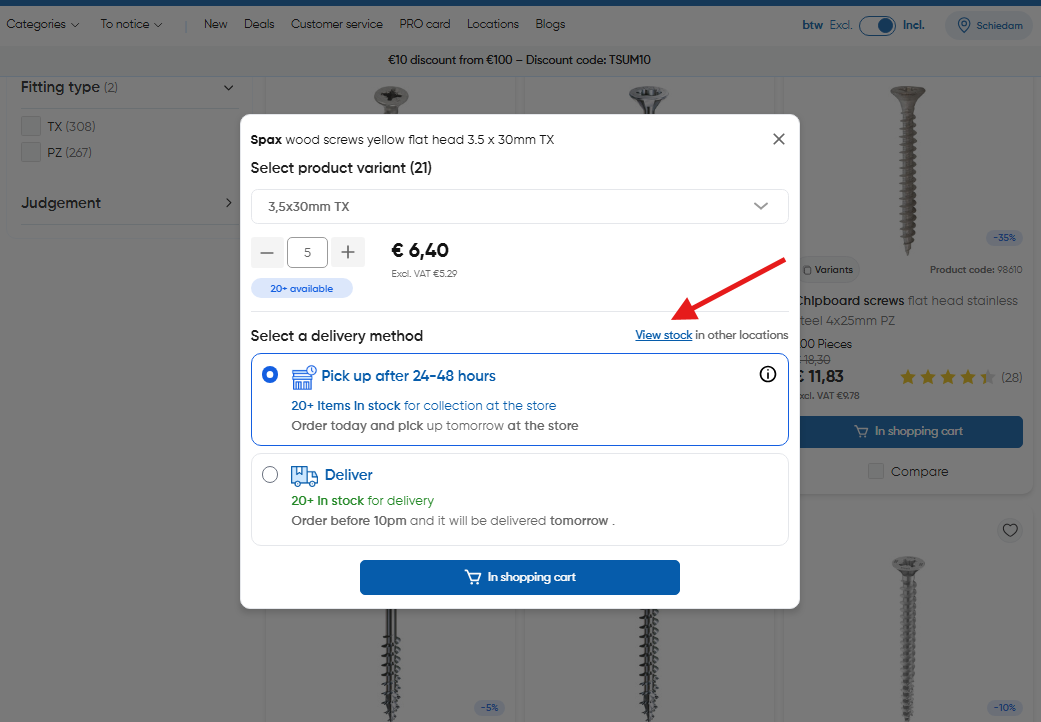
PDP Trigger
- In PDP, "view stock" option can be seen below the click and collect CTA
- Appears when user has set a branch in the application
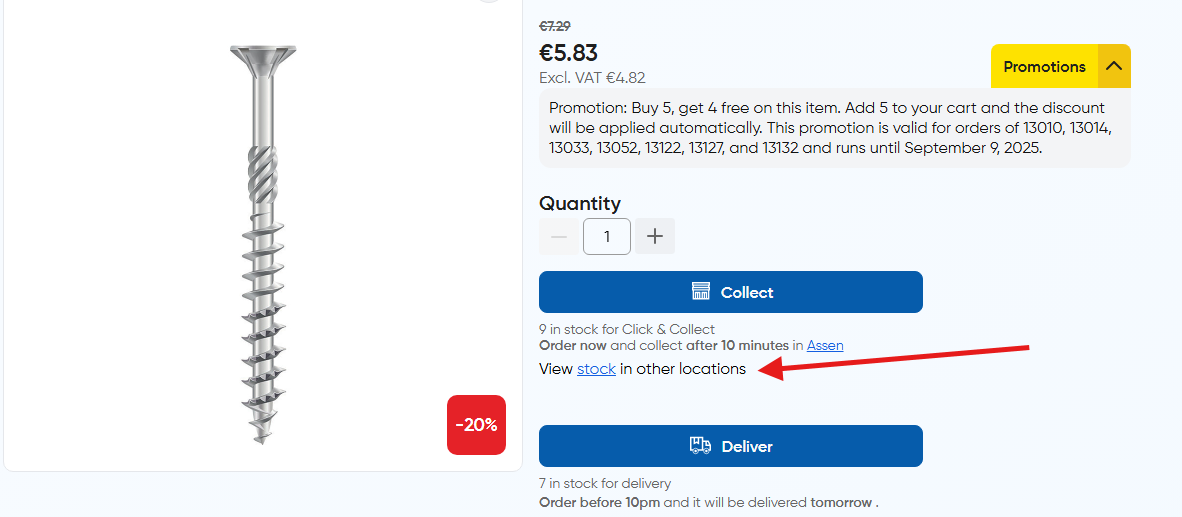
Core Actions - "Check Stock":
- Step-1: Fetch all branches
- Step-2: Fetch stock of the product in all branches
- Step-3: Sort the branches based on distance and display the sorted result
The List
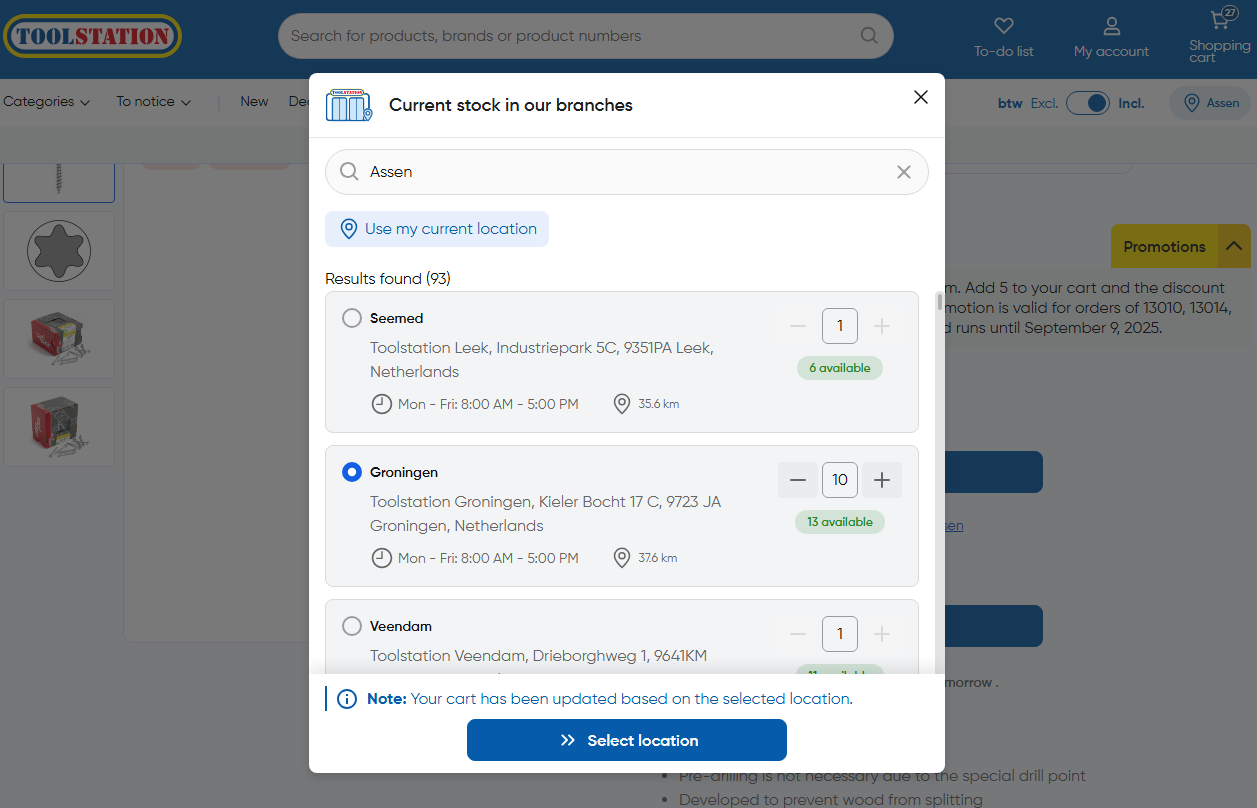
Important To Note:
- The list is sorted based on the distance of the branch from the user's current search query
- By default, the search is triggered based on the user's selected branch and its name is displayed in the search bar to let the user know
- Branches with 0 stock are pushed to the very end of the list by the sorting logic prioritizing distance and availability
- An alert is shown to the user to notify that branch selection could affect existing items in the trolley. Read about implications here
Technical Approach
The getNearByStock() method in stock.store.ts implements the nearby stock feature through the following process:
Implementation
1: Data Initialization
- Clears existing
branches_with_stock_dataarray to trigger a fresh search
2: Fetch All Branches
- Uses
EcomService.fetchAllBranches()to retrieve all available branches - Extracts branch IDs for stock lookup and mapping
- Throws error in case of no branches are found
// ~/store/stock.store.ts
const ecomService = new EcomService();
const allBranchesResponse = await ecomService.fetchAllBranches();
if (!allBranchesResponse?.data?.length) {
  $customClientWarningHandler(
    "high",
    "No branches found - nearby stock search",
    warningMeta
  );
}

const allBranchIds = allBranchesResponse.data.map((branch) => branch.id);
3: Fetch Stock Data
- Calls
EcomService.fetchStockProduct()with:- Product codes list
- All branch IDs
- Creates a
stock maplinking site IDs to stock quantities - Throws error in case of no stock data is found
const { data: stockResponse } = await EcomService.fetchStockProduct({
  products: [product_code],
  sites: allBranchIds,
});

if (!stockResponse) throw new Error("Unable to fetch nearby stock");

const stockMap = new Map(
  stockResponse.map((item) => [item.site_id, parseInt(item.stock_qty, 10)])
);
4: Data Enrichment & Sorting
- Enriches branch data with:
- Stock quantities
- Calculated distances from backend
- Implements the sorting algorithm:
- Primary sort: Distance-based ordering (closest first)
- Secondary sort: Branches with stock (≥1) appear first
const sortedBranches = [...branches].sort((a, b) => {
  if (a.stock === b.stock) return a.distance - b.distance;
  return b.stock - a.stock;
});
5: Final Processing
- Maps to final structure with:
- Branch details
- Entered quantity
- Available stock
// ~/store/stock.store.ts
this.branches_with_stock_data = enrichedBranches
  .filter(({ distance }) => distance !== 0)
  .map(({ branch, q }) => ({
    branch,
    entered_quantity: required_quantity,
    available_stock: q,
  }));
Error Handling
- Warning for no branches found
- Error tracking for API failures
- Custom client error handlers with detailed metadata
Key Features
- Smart Sorting: Prioritizes branches with available stock, then sorts by proximity
- Distance-Based Search: Uses geolocation coordinates for accurate distance calculation
- Error Handling: Comprehensive error tracking with custom handlers
- Flexible Input: Accepts custom location coordinates via
nearest_request - Quantity Awareness: Tracks both required and available quantities