

Trolley
Trolley Session Management
Frontend architecture for trolley session and core APIs
Description
This document highlights the core concepts of trolley CRUD operations, including creating, retrieving and updating a trolley.
Basic Features and Usecases
- Multi Channel Support: Users are allowed to add items for both delivery and store click-and-collect. (More info about various channels here)
- Consistent Experience: User's trolley data is synchronized across devices, ensuring a smooth and consistent shopping experience.
- Guest Trolley: Visitors on the site can add items to their trolley without creating an account.
- Guest to Customer Conversion: When a user logs in, their guest trolley is converted into a customer trolley, preserving their trolley content.
Introduction
- Technically, a trolley can consist of multiple lines, each representing a single item.
- Critical attributes associated with a Trolley Line are quantity, delivery channel, discount or promotional info. etc.
- Guest trolley can not be ordered. It must be converted into user's trolley to place an order.
- For logged in users or during guest checkout,
it's mandatory to send both
X-Toolstation-Session-TokenandX-Toolstation-Customer-Idheaders.
Trolley Create Flow - WEB
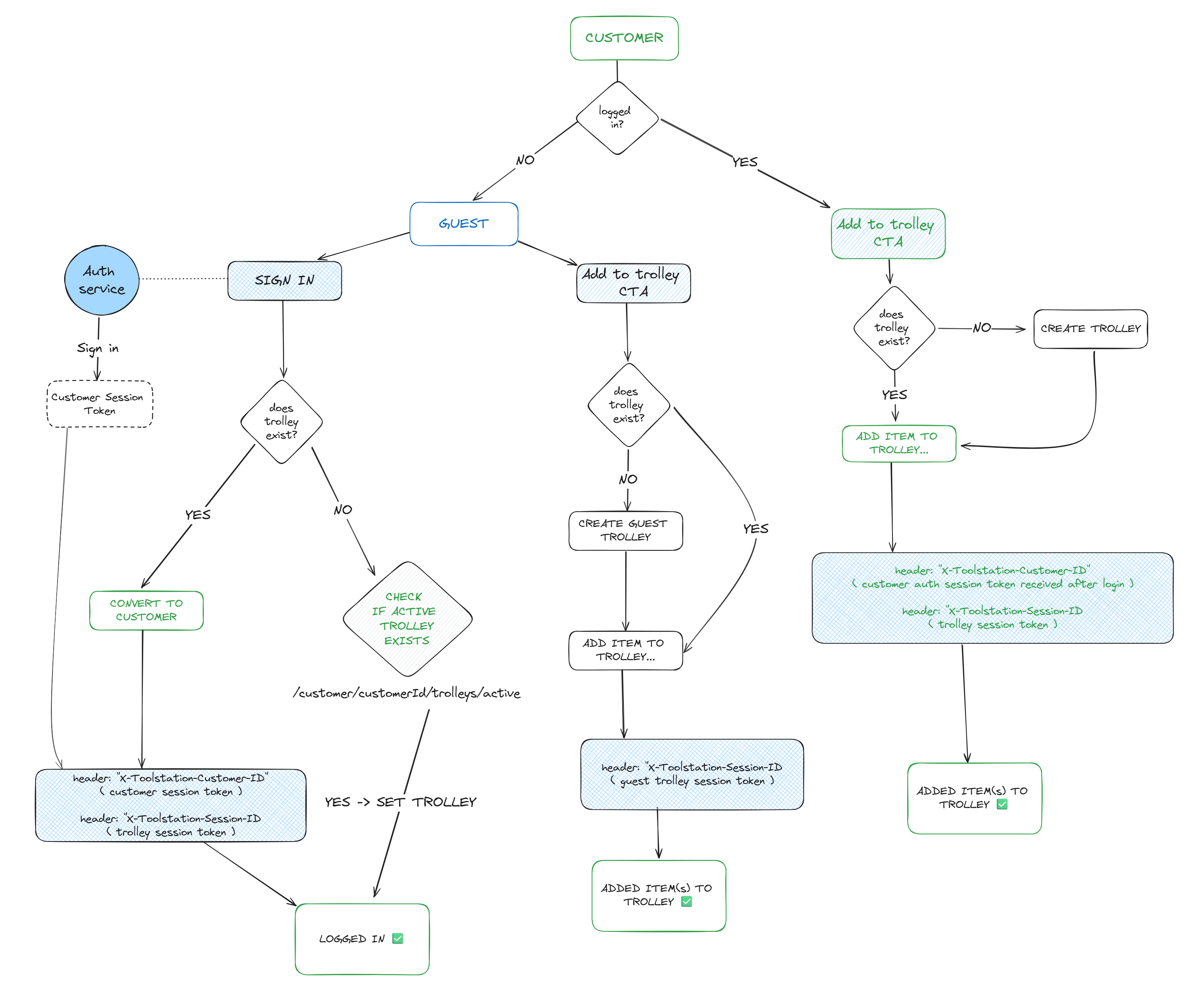
1. Create Trolley
- Initializes a new trolley instance for a guest or authenticated user.
- Typically called when adding items without an existing trolley on the frontend (trolleyId in cookie)
- Returns trolley resource with a newly created trolley ID and session token.
- Trolley ID is stored in cookies to avoid creating a new trolley on every request.
- API docs: Create New Trolley
const CUSTOMER_ENDPOINTS = {
  GUEST_TROLLEYS: `/customers/guest/trolleys`,
  CUSTOMER_TROLLEYS: (customerId: string) =>
    `/customers/${customerId}/trolleys`,
};
async function createTrolley(trolleyRequest?: CreateTrolleyRequest) {
    const trolleyHeaders = {};
    const authStore = useAuthStore();

    if (authStore.user) {
      trolleyHeaders["X-Toolstation-Customer-Id"] = authStore.user.token;
    }

    const requestOptions: = {
      method: "POST",
      headers: trolleyHeaders,
    };

    if (trolleyRequest) requestOptions.params = trolleyRequest;

    const createTrolleyEndpoint = authStore.isAuthenticated
      ? CUSTOMER_ENDPOINTS.CUSTOMER_TROLLEYS(authStore.user.id)
      : CUSTOMER_ENDPOINTS.GUEST_TROLLEYS;

    return await useAjaxEcom<TrolleyResponse>(createTrolleyEndpoint, requestOptions);
}
2. Retrieve Trolley
- Once a trolley is created, details can be retrieved using the trolley ID.
- Endpoint: GET
/trolleys/{trolleyId} - API docs: Get Trolley
async function getTrolleyDetails(
  trolleyId: string,
  trolleySessionToken: string
) {
  const trolleyHeaders = {};
  const authStore = useAuthStore();

  if (authStore.user || authStore.guest) {
    trolleyHeaders["X-Toolstation-Customer-Id"] =
      authStore.user.token || authStore.guest.token;
  }

  trolleyHeaders["X-Toolstation-Session-Id"] = trolleySessionToken;

  return await useAjaxEcom<TrolleyResponse>(`/trolleys/${trolleyId}`, {
    headers: trolleyHeaders,
  });
}
3. Add To Trolley
- Adds a new line item to an existing trolley
- While adding, we can specify the quantity and channel (delivery or collection)
- Endpoint: POST
/trolleys/{trolleyId}/lines - API docs: Create New Trolley Line
async function addToTrolley(
  trolleyId: string,
  addToTrolleyRequest: TrolleyLineRequest,
  trolleySessionToken: string
) {
  const trolleyHeaders = {};
  const authStore = useAuthStore();

  if (authStore.user) {
    trolleyHeaders["X-Toolstation-Customer-Id"] = authStore.user.token;
  }

  trolleyHeaders["X-Toolstation-Session-Id"] = trolleySessionToken;

  return await useAjaxEcom<TrolleyResponse>(`/trolleys/{trolleyId}/lines`, {
    method: "POST",
    params: addToTrolleyRequest,
    headers: trolleyHeaders,
  });
}
4. Update a Trolley Item
- Modifies existing trolley line attributes (e.g. quantity / channel / delivery_method_code)
- Uses line ID to identify specific item
- Endpoint: PATCH
/trolleys/lines/{lineId} - API docs: Update Trolley Line
async function updateTrolleyItem(
  lineId: number,
  updateRequest: TrolleyItemUpdateRequest,
  trolleySessionToken: string
) {
  const trolleyHeaders = {};
  const authStore = useAuthStore();

  if (authStore.user) {
    trolleyHeaders["X-Toolstation-Customer-Id"] = authStore.user.token;
  }

  trolleyHeaders["X-Toolstation-Session-Id"] = trolleySessionToken;

  return await useAjaxEcom<TrolleyResponse>(`/trolleys/lines/${lineId}`, {
    method: "PATCH",
    params: updateRequest,
    headers: trolleyHeaders,
  });
}
5. Delete Item From Trolley
- Removes an item from trolley by individual line ID
- Endpoint: DELETE
/trolleys/lines/{trolleyLineId} - API docs: Delete Trolley Line
async function deleteTrolleyItem(lineId: number, trolleySessionToken: string) {
  const trolleyHeaders = {};
  const authStore = useAuthStore();

  if (authStore.user) {
    trolleyHeaders["X-Toolstation-Customer-Id"] = authStore.user.token;
  }

  trolleyHeaders["X-Toolstation-Session-Id"] = trolleySessionToken;

  return await useAjaxEcom(`/trolleys/lines/${lineId}`, {
    method: "DELETE",
    headers: trolleyHeaders,
  });
}
6. Get Customer's Active Trolleys
- Fetches all active trolleys for a logged in customer
- "Active Trolleys" are sorted based on last modified date which ensures sync across all devices / browsers
- Requires customer associated token in
X-Toolstation-Customer-IDheader which is obtained from login or account creation. - Endpoint: GET
/customers/{customerId}/trolleys/active
async function fetchActiveCustomerTrolleys(
  customerId: string,
  customerToken: string
) {
  const headers = {
    "X-Toolstation-Customer-Id": customerToken,
  };

  return await useAjaxEcom<{ data: TrolleyResponse[] }>(
    `/customers/${customerId}/trolleys/active`,
    {
      headers,
    }
  );
}
7. Convert Guest Trolley To Customer
- Migrates guest trolley to logged in customer after login or account creation
- Requires customer ID for the guest trolley to be converted
- Requires BOTH the guest trolley sesson token to be sent in
X-Toolstation-Session-IDand customer associated token inX-Toolstation-Customer-IDheaders which are obtained from login or account creation. - Endpoint: PATCH
/trolleys/{trolleyId}/convert-to-customer - API docs: Convert Guest Trolley
async function convertToCustomer(
  trolleyId: string,
  customerId: string,
  // Required
  trolleySessionToken: string,
  // Required
  customerToken: string
) {
  const trolleyHeaders = {
    "X-Toolstation-Session-Id": trolleySessionToken,
    "X-Toolstation-Customer-Id": customerToken,
  };

  return await useAjaxEcom<TrolleyResponse>(
    `/trolleys/${trolleyId}/convert-to-customer`,
    {
      method: "PATCH",
      params: { customer_id: customerId },
      headers: trolleyHeaders,
    }
  );
}