

Stock
Get Stock - ECOM
Explains the technical approach to fetch stocks for products and how the product response is transformed with injected stock details
Core API
- POST
stock/getStocks - Request Body: This endpoint can accept a list of product codes and a list of sites (places).
- "WW" is the default site to get the Delivery Stock It often stands for warehouse.
- Additionally we can send branch IDs to get the Collection Stock for user selected branch.
{
  "products": ["product_code_1", "product_code_2"],
  "sites": ["WW", "branch_id"]
}
- Response:
The fetch request masks stock levels for all possible combinations.
{
  "data": [
    {
      "product_code": "93792",
      "stock_qty": "1",
      "site_id": "EA",
      "is_direct_ship": false
    },
    {
      "product_code": "93792",
      "stock_qty": "5",
      "site_id": "WW",
      "is_direct_ship": false
    }
  ]
}
Refer API Docs for more details
Custom Types:
// ~/types/ecom/product/product.type.ts
export type Product = {
    ...core product attributes
    // Custom Properties
    stockDetails?: ProductStockDetails;
    outOfStockForDelivery?: boolean;
    outOfStockForCollection?: boolean;
}

export type ProductStockDetails = {
    delivery?: number;
    collection?: number;
};
Flow Diagram
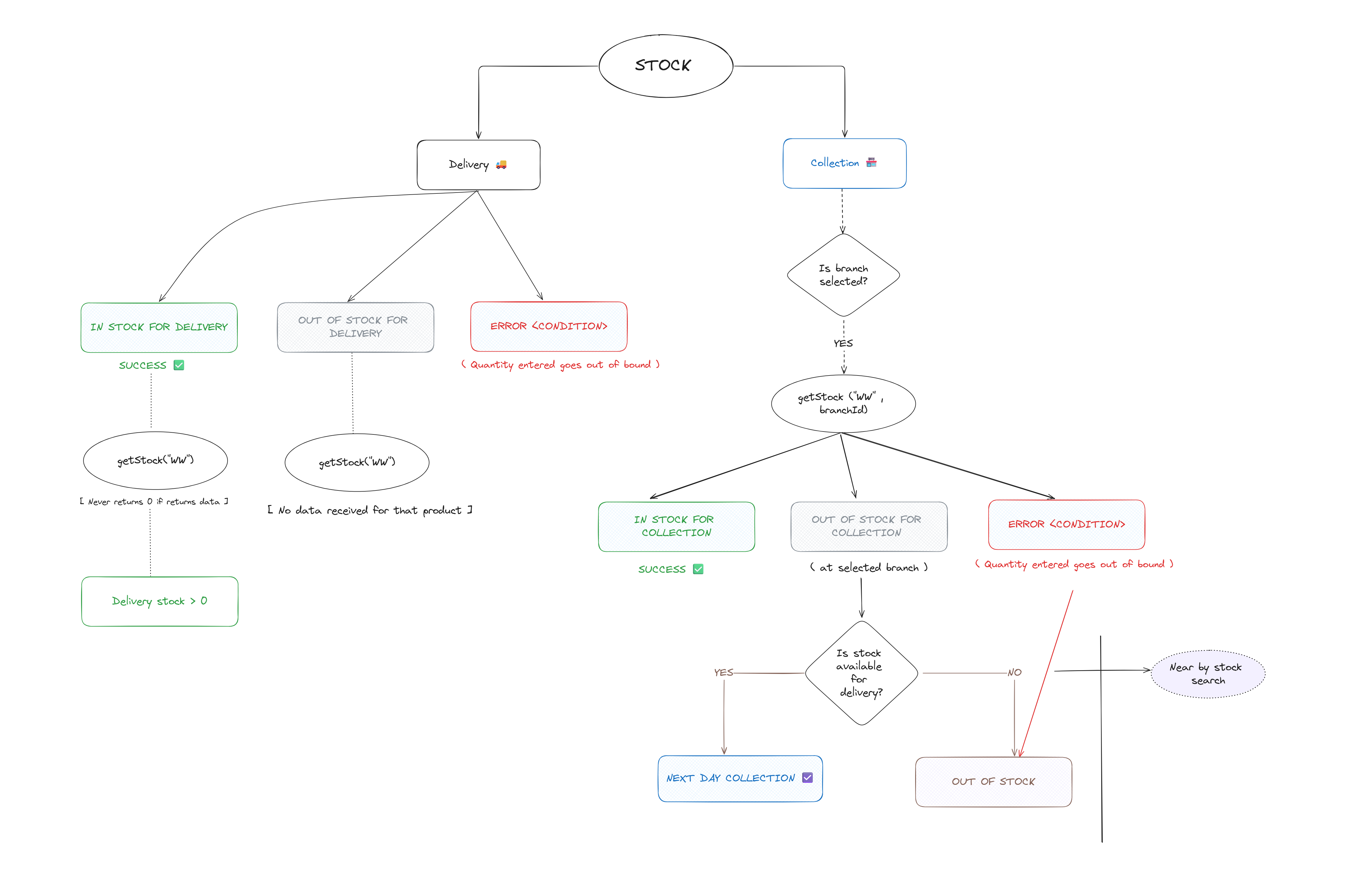
Common Occurences Of Stock Fetch:
- On clicking of add to trolley button on product card
- While rendering product details page
- While rendering product listing page
- While setting trolley resources in trolley and checkout flow
Pinia Store
- The stock store has global actions to fetch product details and their stocks. Then update the product schema with the stock details.
- These actions are called when fetching "trolley" sensitive details in the application.
STEP-1: Fetch Product Details
The main entry point getStockForProducts() validates input and fetches product details first:
async getStockForProducts(products: string[]): Promise<Product[]> {
  if (!products.length) {
    throw new Error("failed to get stock - product codes array is empty");
  }

  // Fetch product details from the products API
  const productsResponse = await this.getAllProducts(products);

  // Continue to stock fetching...
}
STEP-2: Fetch Stock Details
The fetchStockProduct() method handles stock data retrieval and transformation:
STEP-2A: Configure Sites & Fetch Stock
async function fetchStockProduct(products: string[]): Promise<Product[]> {
  let sites: string[] = [DeliverySiteId]; // "WW" for delivery
  const branchStore = useBranchStore();
  const selectedBranchId = branchStore.lastSavedBranch?.id; // User selected branch ID

  // Add branch for collection stock if branch is set
  if (branchStore.is_branch_set) sites.push(selectedBranchId || "");

  // Fetch stock from ECOM API
  const response = await EcomService.fetchStockProduct(
    { products, sites },
    nuxtApp,
    runtimeConfig
  );

  // ...Continue to transform
}
STEP-2B: Validate & Transform Response
async function fetchStockProduct(products: string[]): Promise<Product[]> {
  //...
  if (!response || !Array.isArray(response.data)) {
    return [];
  }

  // Inject stock data into product details
  return this.transformProducts(
    productsResponse,
    response.data,
    selectedBranchId
  );
}
Key Points:
- Always includes delivery site ("WW")
- Conditionally adds branch site for collection stock
STEP-3: Transform Product Schema
The transformProducts() method enriches each product with stock information:
STEP-3A: Stock Data Injection
async function transformProducts(
  productsResponse: Product[],
  productStockLevels: StockLevel[],
  selectedBranchId: string | null
): Promise<Product[]> {
  return productsResponse.map((product) => {
    let stockDetails: ProductStockDetails = {};
    // Extract stock data
    const deliveryStockLevel = productStockLevels.find(
      (stockLevel) => stockLevel.site_id === DeliverySiteId // "WW"
    );
    const collectionStockLevel = productStockLevels.find(
      (stockLevel) => stockLevel.site_id === selectedBranchId
    );

    // Set stock details
    if (deliveryStockLevel) {
      stockDetails.delivery = parseInt(deliveryStockLevel.stock_qty, 10);
    }
    if (collectionStockLevel) {
      stockDetails.collection = parseInt(collectionStockLevel.stock_qty, 10);
    }

    // Update product with stock details
    product.stockDetails = stockDetails;
    product.outOfStockForDelivery = !stockDetails?.delivery;
    product.outOfStockForCollection =
      !stockDetails?.collection && !!selectedBranchId;

    return product;
  });
}
STEP-3B: Availability Flags Computation
async function computeOutOfStockFlagValues(
  stockDetails: ProductStockDetails,
  isBranchSet: boolean
) {
  const availability = {
    outOfStockForDelivery: !stockDetails?.delivery,
    outOfStockForCollection: !stockDetails?.collection && isBranchSet,
  };

  return availability;
}
STEP-3C: Final Product Enhancement (Custom Properties Added)
return {
  ...product,
  stockDetails,
  outOfStockForDelivery,
  outOfStockForCollection,
};
Key Points:
- Masks stock levels by product code and site ID
- Computes availability flags for UI display
Benefits Of This Architecture
- Coupling For Ease Of State Management: Stock mapping makes it easier to manage the state of products and their stocks.
- Reusable Logic: Stock transformation logic is centralized and reusable
- UI-Ready Data: Products are returned with computed availability flags for immediate use
- Easier Conditions: Applying conditions based on product stock becomes easier since the stock data is encapsulated in the product schema itself