

Section Models
Product Combo Offer
Product combo offers are a type of offer that combines multiple products into a single offer for the product details page.
Product Combo Offer
Product combo offers are a type of offer that combines multiple products into a single offer for the product details page.
To open the entry on builder, Click on the Section Model > Product Combo Offer in the left navigation panel & Open the entry.
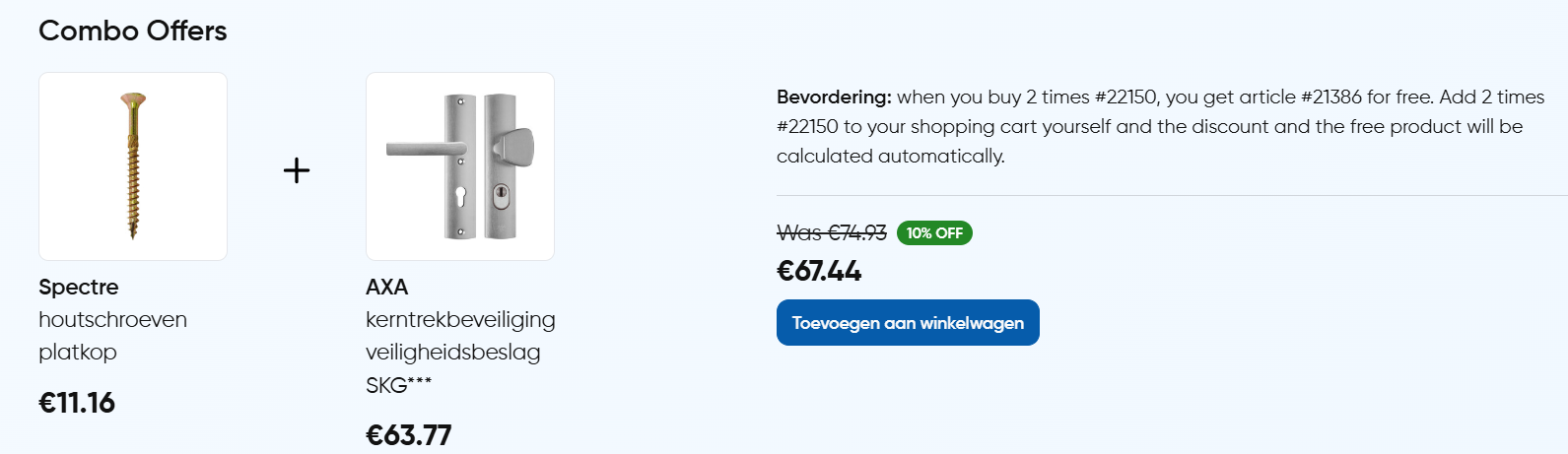
Edit the existing entry,
- After selecting the entry you will be able to see the builder editor.
- Select the
ComboOffercomponent from the right side layer. - Enter the Product IDs in the
Product IDsfield to fetch the product with combo offer.
Add a new entry,
- Click on the
+ Add Entrybutton & Select theProduct Combo Offermodel from the list. - Drag and drop the
ComboOffercomponent to the components layer. - Enter the Product IDs in the
Product IDsfield to fetch the product with combo offer. - Enter other props as per the need.
- Click on the
Savebutton to save the entry.
ComboOfer Component
The ComboOffer component is used to fetch the product with combo offer.
Props
| Name | Type | Default | Description |
|---|---|---|---|
| productIds | string | "" | It is used to provide the productIds to the component. |
| promotionText | richText | "" | It is used to add the promotion text to the component. |
| discountType | boolean | "" | It is used to select the type of discount to be applied to the product. |
| percentageOff | number | "" | It is used to add the percentage off to the component. |
| prcieOff | number | "" | It is used to add the price off to the component. |