

Promotion V2
Our app previously had a feature called PromotionV1, which displayed product-specific offers or discounts on the PDP inside a yellow box with clickable links. PromotionV2 is an upgraded version of this feature. It has a better UI and allows users to directly add promotional products to the trolley using a checkbox on the PDP.
1. What is PromotionV1 and PromotionV2?
1.1 PromotionV1
- PromotionV1 is the older promotion system. It simply shows product-level offers in a yellow box on the PDP, along with clickable links and basic offer details.
1.2 PromotionV2
- PromotionV2 is the newer, backend-driven promotion system. It shows dynamic promotional messages on the PDP. The backend sends a list of promotions, and the app decides how to display them based on defined rules.
PromotionV2 types include:
- Bulk savings – Shows a table explaining how much discount the user gets when buying in bulk.
- Free item promotions – User gets a free item when buying a specific product.
- Multi-buy deals – Buying certain products together gives the user a discount.
- Bundle offers – Buying products as a bundle (e.g., a lawnmower + fuel) gives a trolley-level discount.
The backend sends a list of promotions, and the app decides how to show them using simple rules.
1.3 Promotion FlowChart
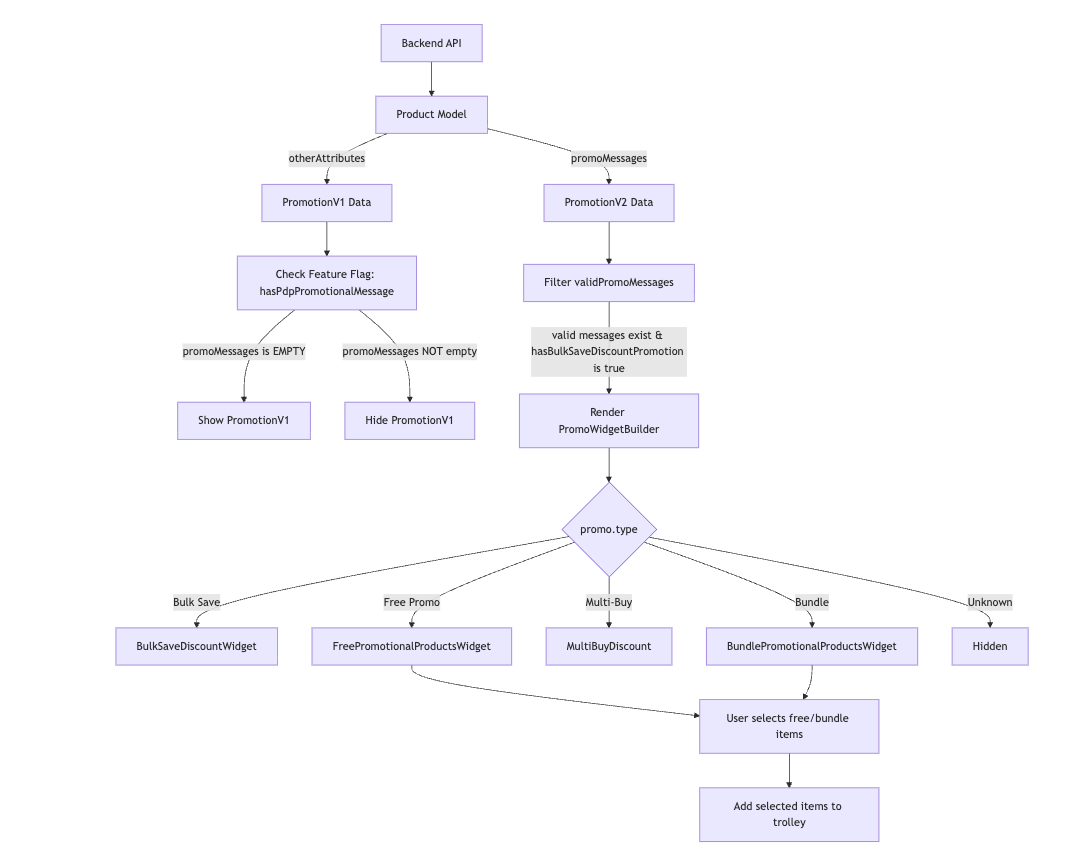
flowchart TD

%% BACKEND → PRODUCT
A[Backend API] --> B[Product Model]

B --> |otherAttributes| C[PromotionV1 Data]
B --> |promoMessages| D[PromotionV2 Data]

%% PROMOTIONV1 DECISION
C --> E[Check Feature Flag: hasPdpPromotionalMessage]
E --> |promoMessages is EMPTY| F[Show PromotionV1]
E --> |promoMessages NOT empty| G[Hide PromotionV1]

%% PROMOTIONV2 ENTRY
D --> H[Filter validPromoMessages]
H --> |valid messages exist & hasBulkSaveDiscountPromotion is true| I[Render PromoWidgetBuilder]

%% PROMOTIONV2 TYPE SELECTION
I --> J{promo.type}

J --> |Bulk Save| K[BulkSaveDiscountWidget]
J --> |Free Promo| L[FreePromotionalProductsWidget]
J --> |Multi-Buy| M[MultiBuyDiscount]
J --> |Bundle| N[BundlePromotionalProductsWidget]
J --> |Unknown| O[Hidden]

%% TROLLEY INTERACTION
L --> P[User selects free/bundle items]
N --> P
P --> Q[Add selected items to trolley]
2. Data Model
PromotionsV1 and V2 both come from the backend inside the Product object.
2.1 Product Model
const Product({
  required this.otherAttributes, // PromotionV1 comes inside otherAttributes (ID: 302)
  required this.promoMessages,   // PromotionV2 data
  // ...other fields
});
promoMessages: A list ofPromoMessageobjects, each representing a single PromotionV2 entry.otherAttributes: A list ofProductAttributeitems, each identified by a unique ID.
2.2 Product API response
{
  "data": {
    "other_attributes": [
      {
        "id": 83,
        "key": "Product Review Rating",
        "value": "4.25"
      },
      {
        "id": 302,  // PromotionV1 Uniuqe Id: 302
        "key": "Promo Message", // PromotionV1 keys
        "value": "<b>ACTIE</b> Deze week 25% korting op Sola waterpassen. Deze actie is geldig t/m 24 november 2025. Kijk <a href=\"https://www.toolstation.nl/search?q=weekdeal\">hier</a> voor alle weekdeals." // PromotionV1 Value in html format to support link click
      },
      {
        "id": 10098,
        "key": "red tag",
        "value": "Weekdeal"
      }
    ],
    "promo_messages": [ // PromotionV2 - Bulk Save Promotion API Response
      {
        "message": "BULK SAVE: Buy More, Save More",
        "headline": "BULK SAVE",
        "sub_heading": "Buy More, Save More",
        "body": null,
        "item_selector": {
          "match": "itemIds",
          "ids": [
            "30852"
          ]
        },
        "group_selector": {
          "list": {
            "match": "itemIds",
            "ids": [
              "30852"
            ]
          },
          "field": "quantity",
          "count": 1,
          "max": 0
        },
        "discount_values": [
          {
            "count": 3,
            "value": 5
          },
          {
            "count": 6,
            "value": 10
          }
        ],
        "discount_table": [
          {
            "qty": "1 - 2",
            "discount": "0%",
            "price": "£0.55"
          },
          {
            "qty": "3 - 5",
            "discount": "5%",
            "price": "£0.52"
          },
          {
            "qty": "6+",
            "discount": "10%",
            "price": "£0.50"
          }
        ]
      },
    ]
  }
}
2.3 Accessing PromotionV1 Data
- PromotionV1 data is embedded inside otherAttributes. The Product model includes a getter to extract these messages:
 List<String> get promotionalMessages {
  return otherAttributes
      .where((attribute) => attribute.id == AttributeId.promotionalMessage)
      .map((attribute) => attribute.value)
      .toList(growable: false);
}
2.4 PromoMessage Model
const PromoMessage({
  required this.message,
  required this.headline,
  required this.subHeading,
  required this.body,
  required this.promotionalProducts,
  required this.discountValues,
  this.discountTable,
  this.groupSelector,
});
| Field | Used In Promo Type | Description |
|---|---|---|
| headline | All | Main title for the promo |
| subHeading | All | Secondary line |
| body | All | Longer descriptive text |
| message | All | Fallback string |
| promotionalProducts | Free Promo, Bundle | Free/bundle items |
| discountValues | Multi-buy, Bundle | Numeric discount indicator |
| discountTable | Bulk Save | Tiered quantity-based discount |
| groupSelector | Multi-buy | Contains quantity requirement |
3. How Promotion Types Are Detected
The app uses simple rules to decide the type of each promotion:
| Promo Type | How Detected (in order) |
|---|---|
| Bulk Save | discountTable?.isNotEmpty == true |
| Free Promo | (discountValues ?? 0) == 0 |
| Multi-Buy | (discountValues ?? 0) > 0 && (groupSelector?.count ?? 0) > 1 |
| Bundle | promotionalProducts.isNotEmpty && (discountValues ?? 0) != 0 |
| Unknown | Anything else |
4. UI Implementation of PromotionV1 and V2
4.1 PromotionV1 on PDP:
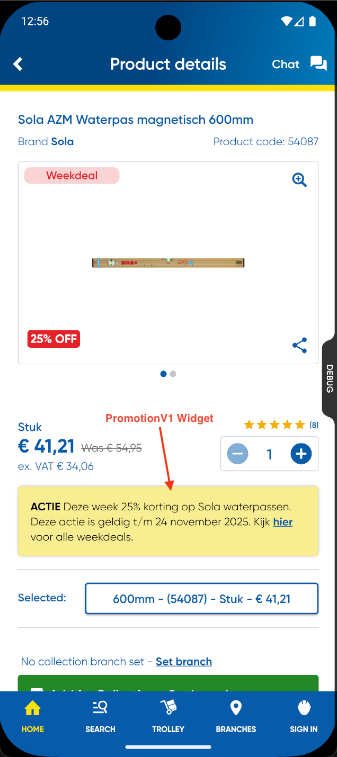
- PromotionV1 is rendered on the PDP using a simple rule:
- Show PromotionV1 only when PromotionV2 is disabled or empty.
- Never show PromotionV1 and V2 together for the same product.
hasPdpPromotionalMessage→ Remote Config flag that controls whether PromotionV1 is allowed to be shown.promoMessage.isEmpty→ Ensures PromotionV2 is not available for this product.- If PromotionV2 exists, PromotionV1 is hidden.
This rule is enforced by the following condition inside the PDP widget tree:
if (hasPdpPromotionalMessage && promoMessage.isEmpty)
  for (var i = 0; i < promotionalMessages.length; i++)
    Padding(
      padding: horizontalPadding24,
      child: Column(
        crossAxisAlignment: CrossAxisAlignment.stretch,
        children: [
          verticalMargin16,
          PromotionalMessage(
            message: promotionalMessages[i],
            expiryDate: promotionalMessageExpiries.elementAtOrNull(i),
          ),
        ],
      ),
    ),
4.2 PromotionV2 on PDP:
- PromotionV2 is rendered on the PDP using the
PromoWidgetBuilder. - The main entry condition is:
hasBulkSaveDiscountPromotion == true.validPromoMessages.isNotEmpty == true
4.3 PromoWidgetBuilder
File: lib/features/product/widgets/promotion_builder.dart
- The
PromotionBuilderconstructor requires two parameters:promo— of typePromoMessageproductCode— of typeString
cconst PromoWidgetBuilder({
  super.key,
  required this.promo, // PromoMessage Type
  required this.productCode, // ProductCode String
});
How PromoWidgetBuilder is placed on the PDP
- On the PDP, the widget is rendered only when the product has
hasBulkSaveDiscountPromotionistrueand when there are valid promo messages:
  if (hasBulkSaveDiscountPromotion && validPromoMessages.isNotEmpty) ...[
  ListView.separated(
    shrinkWrap: true,
    physics: const NeverScrollableScrollPhysics(),
    itemCount: validPromoMessages.length,
    separatorBuilder: (_, _) => verticalMargin16,
    itemBuilder: (context, index) {
      final promo = validPromoMessages[index];
      return PromoWidgetBuilder(
        key: Key('promotion-builder-widget-$index'),
        promo: promo,
        productCode: product.code,
      );
    },
  ),
],
validPromoMessagesis a getter defined inside the_ProductSummaryclass on the PDP. Its purpose is to filter out invalid promotions before sending them toPromoWidgetBuilder.
  List<PromoMessage> get validPromoMessages {
  return product.promoMessages.where((promo) => promo.isValidPromo).toList();
}
- A promotion is considered valid when its type is not
PromoType.unknown:
bool get isValidPromo => type != PromoType.unknown;
- This
isValidPromologic is defined inside an extensionPromoTypeExtwithin thePromoWidgetBuilderfile. - The PromoWidgetBuilder is responsible for:
- Reading the PromoMessage object
- Determining the correct PromoType
- Rendering the appropriate PromotionV2 widget
- Filtering out the root product from promotionalProducts to avoid showing the same product twice
Rendering Logic:
switch (promo.type) {
  case PromoType.bulkSave:
    return BulkSaveDiscountWidget(...);
  case PromoType.freePromo:
    return FreePromotionalProductsWidget(...);
  case PromoType.multiBuy:
    return MultiBuyDiscount(...);
  case PromoType.bundle:
    return BundlePromotionalProductsWidget(...);
  case PromoType.unknown:
    return emptyWidget;
}
Widgets Used:
| PromoType | Widget | Purpose |
|---|---|---|
| bulkSave | BulkSaveDiscountWidget | Shows bulk save tiers |
| freePromo | FreePromotionalProductsWidget | Shows "Free With Purchase" box |
| multiBuy | MultiBuyDiscount | Shows multi-buy deals |
| bundle | BundlePromotionalProductsWidget | Shows bundle deal UI |
| unknown | emptyWidget | Hides unused promos |
5. Promotion Types Explained
5.1 Bulk Save Promotion
File: lib/features/product/widgets/bulk_saving_discount.dart
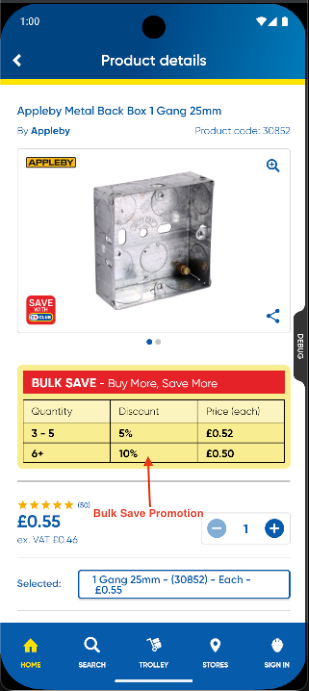
Constructor
BulkSaveDiscountWidget(
  message: promo.message,        // Used only when both headline & subHeading are empty
  headline: headline,            // Main heading (red text)
  subHeading: subHeading,        // Subheading displayed below the headline
  discountRows: discountRows,    // Used to build the discount table (quantity tiers)
);
- Condition:
discountTable.isNotEmpty - Shows quantity tiers (e.g., buy more, save more)
- If headline/subHeading is empty, uses
messageas fallback
5.2 Free Promotion
File: lib/features/product/widgets/free_promotional_products.dart
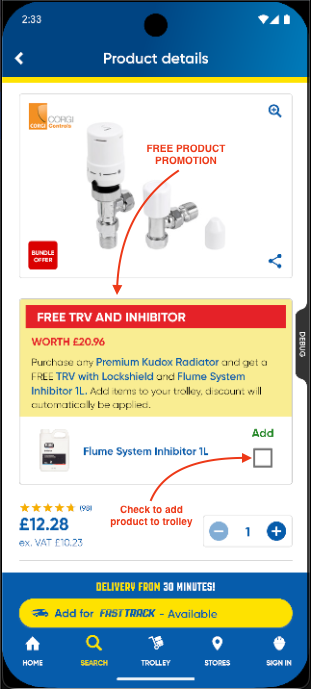
Constructor
FreePromotionalProductsWidget(
  headline: headline,                                 // Main heading (red text)
  subHeading: subHeading,                             // Subheading below the headline
  body: body,                                         // Explanation for the offer
  promotionalProducts: excludedProducts,              // Products eligible for free offer (excluding the root PDP item)
  onUpdateSelectedPromotionalProduct: bloc.onUpdateSelectedPromotionalProduct, // Handles checkbox selections and adds items to trolley
);
- Condition:
discountValues == 0&promotionalProducts.isNotEmpty - Example: Buy a radiator, get a free TRV
- UI features:
- Yellow header block (headline + subheading)
- List of free items (excluding the root product)
- Each free item can be selected/unselected using a checkbox.
- For Free Product no price is displayed within the free promotion widget.
- Items selected by user will be added to trolley
5.3 Multi-Buy Promotion
File: lib/features/product/widgets/multi_buy_promo.dart
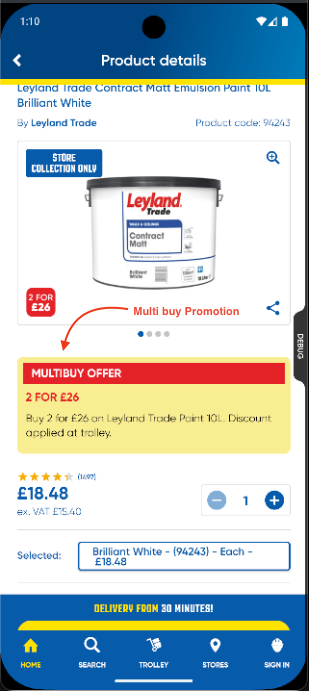
Constructor
MultiBuyDiscount(
  headline: headline,     // Main heading (red text)
  subHeading: subHeading, // Subheading below the headline
  body: body,            // Explanation text for the offer
);
- Condition:
discountValues > 0andgroupSelector.count > 1 - Example: "Buy 2 for £15"
- Uses
MultiBuyDiscountwidget
5.4 Bundle Promotion
File: lib/backend/repositories/remote_config/remote_config.dart
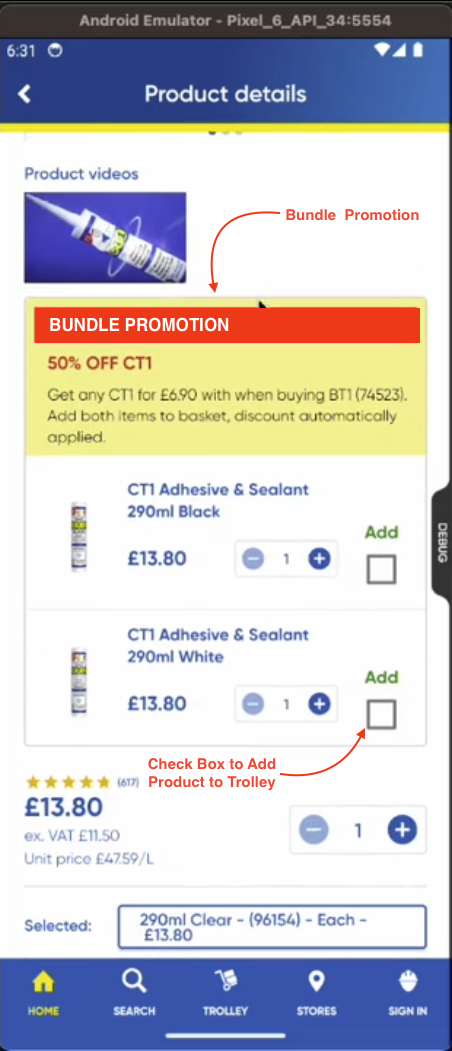
Constructor
BundlePromotionalProductsWidget(
  headline: headline,                     // Main heading (red text)
  subHeading: subHeading,                 // Subheading below the headline
  body: body,                             // Explanation text for the bundle
  promotionalProducts: excludedProducts,  // Products included in the bundle (excluding root PDP product)
);
- Condition:
promotionalProducts.isNotEmpty && discountValues != 0 - Shows main product, bundle items, and combined price
- Used when multiple products are part of a joint discounted price
6. Add-to-Trolley Modal Interaction
- For Free Promo and Bundle promotions, the selected promotional products are added to the basket through bloc.
onUpdateSelectedPromotionalProduct. - When the user taps Add to Delivery or Add to Collection, any selected promotional products are also added to the basket automatically.
PromotionalProductare product which comes under certan offer like freePromotion or Bundle products.
 void onUpdateSelectedPromotionalProduct({
    int? quantity,
    required bool isChecked,
    required PromotionalProduct promotionalProduct,
  }) {
    final selectedPromotionalProducts = currentState.selectedPromotionalProducts.toList();
    final index = selectedPromotionalProducts.indexWhere(
      (e) => promotionalProduct.code == e.promotionalProduct.code,
    );
    final isAlreadyInList = index != -1;

    if (!isChecked) {
      if (isAlreadyInList) {
        selectedPromotionalProducts.removeAt(index);
        _state.add(currentState.copyWith(selectedPromotionalProducts: selectedPromotionalProducts));
      }
    } else {
      if (isAlreadyInList) {
        selectedPromotionalProducts[index] = PromotionalProductWithQuantity(
          promotionalProduct: promotionalProduct,
          quantity: quantity,
        );
        _state.add(currentState.copyWith(selectedPromotionalProducts: selectedPromotionalProducts));
      } else {
        selectedPromotionalProducts.add(
          PromotionalProductWithQuantity(
            promotionalProduct: promotionalProduct,
            quantity: quantity,
          ),
        );
        _state.add(currentState.copyWith(selectedPromotionalProducts: selectedPromotionalProducts));
      }
    }
  }
Promotional Product Model
  const PromotionalProduct({
    required this.code,       // Productcode (String)
    required this.name,       // Product Name (String)
    required this.image,      // Product Image (String)
    required this.priceGross, // Product Price with VAT
    required this.priceNet,   // Product Price without VAT
  });
7. Remote Config Feature Flags
File: lib/backend/repositories/remote_config/remote_config.dart
- PromotionV1 Feature Flag
- The feature flag for PromotionV1 is
FeatureFlag('pdp_promo_banner'). - A corresponding getter is available in
backend.dart:
- The feature flag for PromotionV1 is
bool get hasPdpPromotionalMessage => isFeatureFlagEnabled(FeatureFlag.pdpPromotionalMessage);
- PromotionV2 Feature Flag
- The feature flag for PromotionV2 is
FeatureFlag('pdp_bulk_save_discount_promo'). - A corresponding getter is also available in
backend.dart:
- The feature flag for PromotionV2 is
bool get hasBulkSaveDiscountPromotion => isFeatureFlagEnabled(FeatureFlag.pdpBulkSaveDiscountPromotion);
8. Rendering Order & Priority
Promos are checked in this order:
- Bulk Save
- Free Promo
- Multi-Buy
- Bundle
- If the backend sends overlapping data, these rules decide which promo is shown and in which order.
PromotionV2 Feature Video: PromotionV2 Feature