

Product Badges V2
Introduction
ProductBadgesV2 is the new implementation for displaying promotional product tags across the Product Listing Page (PLP), Product Detail Page (PDP), and Saved List Page. The feature is controlled by the productBadgesV2 Remote Config flag.
This feature is a enhanced version of the old image-based badges (ProductBadgesV1) with text-based color badges that match the new website design.
Purpose of migration:
- Unify tag appearance across website & app
- Remove dependency on remote promotional badge images
- Allow merchandise teams to manage tag values directly via product attributes
- Support better scalability and faster updates
- Controlled via Firebase Remote Config feature flag
ProductBadgesV2 Overview
ProductBadgesV2 displays colored text tags generated from specific product attributes.
Supported tag colors:
- Red
- Blue
- Yellow
- Green
- Black
Attribute IDs for Each Badge
- Each badge color is mapped to a unique AttributeId (Come within Product API response) for consistent identification across the app:
  static const blackTag = AttributeId(10095);
  static const blueTag = AttributeId(10096);
  static const greenTag = AttributeId(10097);
  static const redTag = AttributeId(10098);
  static const yellowTag = AttributeId(10099);
Each badge shows:
- A colored background
- The attribute value as text
- Consistent typography & style across the entire app
The widget processes all attributes and renders badges whose IDs match the defined mapping.
Badge Type Mapping
- When a product is fetched from the backend (via an endpoint such as https://apis.toolstation.nl/ecom/v1/products/84173).
- The API response contains an array called
other_attributes. Each item in this array has a unique ID. We check whether this ID matches any predefined badge types, and if it does, we display the corresponding badge with its value and color.
{
  "data": {
    // Other product details (name, code, prices, etc.)

    "other_attributes": [
      {
        "id": 84,
        "key": "Number of Reviews",
        "value": "1"
      },
      {
        "id": 10096,         // Unique attribute ID
        "key": "blue tag",   // Badge type key
        "value": "Nieuw"     // Text shown on the badge
      },
      {
        "id": 10098,
        "key": "red tag",
        "value": "Flashdeal"
      }
    ],

    "allow_stock_notifications": false
  }
}
ProductBadgeHelper contains the mapping:
static final Map<AttributeId, ProductBadgeType> _idToType = {
  AttributeId.blackTag: ProductBadgeType.black,
  AttributeId.blueTag: ProductBadgeType.blue,
  AttributeId.greenTag: ProductBadgeType.green,
  AttributeId.redTag: ProductBadgeType.red,
  AttributeId.yellowTag: ProductBadgeType.yellow,
};
Example:
| Attribute ID | Value | Result |
|---|---|---|
| redTag | "25% OFF" | Red Badge: "25% OFF" |
ProductBadgesV2 Widget
- Receives a list of ProductAttribute
- Extracts matching attributes
- Constructs a list of _BadgeData
- Renders multiple badges or only the first badge (depending on
showSingleBadgeOnly)
ProductBadgesV2(
  attributes: product.otherAttributes,
  showSingleBadgeOnly: true,
)
Badge rendering uses a Wrap widget so badges flow naturally without layout overflow.
Badge Styling Logic
Text Color & Background Color
- Each badge type defines:
Color get badgeColorColor get badgeBackgroundColor
- Background color is generated using:
badgeColor.blendWith(AppTheme.tsWhite001, 0.2)
- Typography:
- Font size: 14.0
- Weight: FontWeight.w600
- FittedBox ensures text fits in available width
Differences Between V1 and V2
- Both ProductBadges V1 and V2 get their supporting data from Backend (Product API).
| Feature | V1 (ProductBadges) | V2 (ProductBadgesV2) |
|---|---|---|
| Source | Image URLs | Attribute text |
| Design | Images, fixed size | Colored container with text |
| Update method | Static images | Dynamic (via attributes) |
| Position | Overlay positions | Same as old overlay positions |
| Rollout | Always enabled | Feature flag controlled |
| Consistency | Different from web | Fully matches website |
Feature Flag Integration
Flag Definition (in remote_config.dart):
static const productBadgesV2 = FeatureFlag('product_badges_v2');
Getter:
bool get hasProductBadgesV2 => isFeatureFlagEnabled(FeatureFlag.productBadgesV2);
Behavior:
- When enabled, V2 text badges are shown
- When disabled, fallback to existing logic:
- V1 badges (PDP)
- Brand badge (PLP)
- No change in Saved List behavior (previously no badge support)
This allows a safe and gradual rollout.
Where ProductBadgesV2 is Used
1. PDP (Product Detail Page)
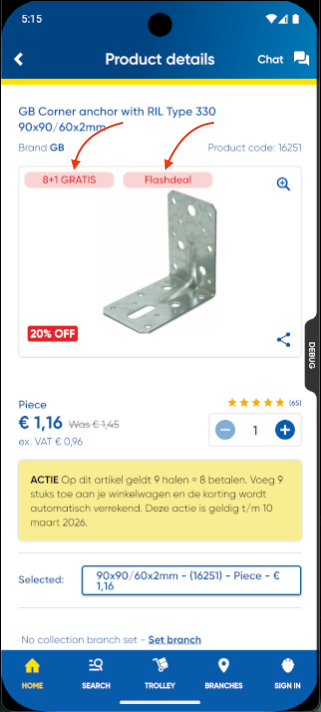
- Displayed at the top-left corner of the product image.
- On the PDP, multiple badges can be displayed simultaneously (e.g., red, green, and blue tags), each showing its respective attribute text.
Positioned(
  top: 0.0,
  left: 0.0,
  child: Row(
    children: [
      if (hasProductBadgesV2)
        ProductBadgesV2(attributes: product.otherAttributes)
      else
        ProductBrandBadge(product: product),
    ],
  ),
)
2. Saved List Page
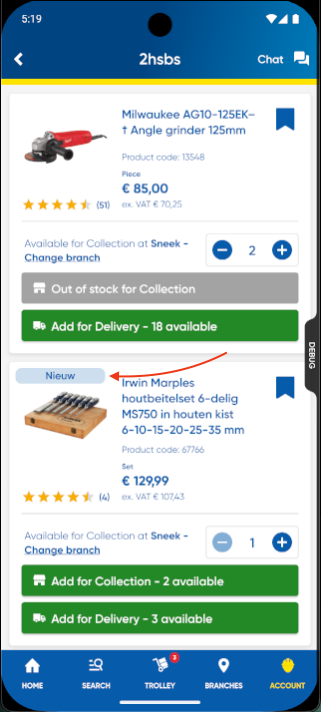
- Only one badge is shown.
- On the Saved List Page, only a single product badge is displayed due to limited horizontal space available in the product card layout.
ProductBadgesV2(
  attributes: product.otherAttributes,
  showSingleBadgeOnly: true,
)
3. Product Listing Page (PLP)
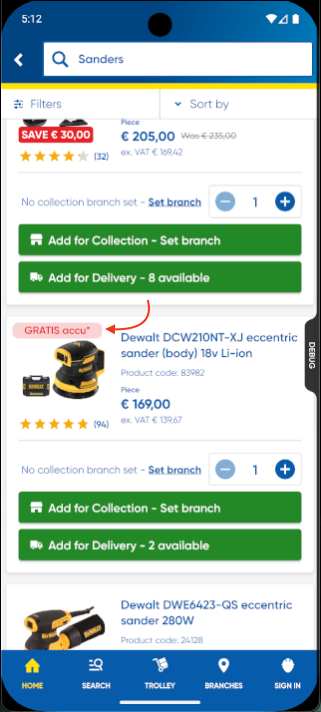
- Badges displayed above product image, replacing brand logos when active.
- On the PLP, only a single product badge is displayed due to limited horizontal space available in the product card layout.
if (hasProductBadgesV2)
  ProductBadgesV2(
    attributes: product.otherAttributes,
    showSingleBadgeOnly: true,
  )
else if (hasPlpBrandLogos)
  ProductBrandBadge(...)
This ensures consistent badge locations across the app.
Data Flow Summary
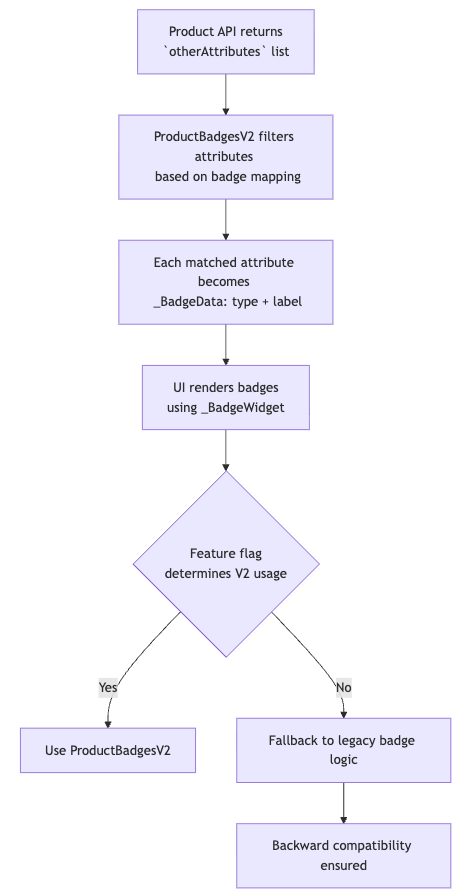
flowchart TD

    A[Product API returns <br/> `otherAttributes` list]
    A --> B[ProductBadgesV2 filters attributes <br/> based on badge mapping]
    B --> C[Each matched attribute becomes <br/> _BadgeData: type + label]
    C --> D[UI renders badges <br/> using _BadgeWidget]
    D --> E{Feature flag <br/> determines V2 usage}

    E -->|Yes| F[Use ProductBadgesV2]
    E -->|No| G[Fallback to legacy badge logic]

    G --> H[Backward compatibility ensured]
other_attributes in the Product API Response:-
{
  "data": {
    // Other product details (name, code, prices, etc.)

    "other_attributes": [
      {
        "id": 10096,         // Unique attribute ID
        "key": "blue tag",   // Badge type key
        "value": "Nieuw"     // Text shown on the badge
      },
      {
        "id": 10098,
        "key": "red tag",
        "value": "Flashdeal"
      }
    ],

    "allow_stock_notifications": false
  }
}
- Product API returns
otherAttributeslist - ProductBadgesV2 filters attributes based on badge mapping
- Each matched attribute becomes _BadgeData(type, label)
- UI renders badges using _BadgeWidget
- Feature flag determines if V2 is used
- Fallback logic ensures backward compatibility
Key Design Decisions
- Attribute-driven UI → more flexible than image overlays
- Color blending extension → ensures consistent theme styling
showSingleBadgeOnlyadded to allow PLP/Saved lists to avoid clutter- Feature flag gating ensures controlled rollout
- Backward compatibility maintained via fallback logic
Edge Cases
- No matching attributes → renders empty widget
- Empty attribute value → ignored
- Unknown attribute ID → ignored
- Multiple badges → supported only in PDP (wrap layout)
Product Badges V2 Feature Video
FEATURE VIDEO: Product Badges V2 Video