

Messaging
Appwide Ribbon Message
Overview
The App Ribbon is a global campaign banner that appears at the top of selected app pages, below the main header. Its visibility is controlled by Remote Config and is region/language aware. Once dismissed, it remains hidden until the app restarts.
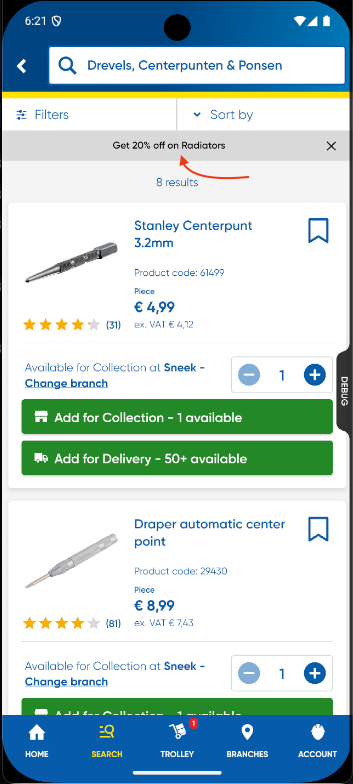
Key Behaviors
When is the ribbon shown?
The ribbon is shown only when all conditions are met:
- Remote Config contains a non-empty
ribbonPromoMessage(English or Dutch) - Ribbon has not been dismissed for the current session
- Page is eligible
If any condition fails, the ribbon is not shown.
Eligible Pages
- Product Detail Page (PDP)
- Promo Codes Page
- Saved List Page
- Product Listing Page (PLP)
- Search Page
- Category Page
- Details Page
Excluded Pages
- Homepage
- Pro Card Application
- Checkout
- Any page not in the eligible list
Page visibility is developer-controlled. The AppRibbon does not auto-detect pages. Developers must manually include the AppRibbon widget where needed.
Remote Config Structure
Ribbon messaging comes from:
final TSDynamicInfoDataComponent? ribbonPromoMessage;
Example Payload:
{
  "ribbon_promo_message": {
    "message": {
      "en": "Spring Sale – Up to 20% Off!",
      "nl": "Lentesale – Tot 20% korting!"
    },
  }
}
- Only
message.enandmessage.nlare used for ribbon text.
Language Logic
NL Region (Netherlands)
- Supports English and Dutch.
- If app language = English → use
message.en - If app language = Dutch → use
message.nl - If selected language message missing → fallback to English
BE Region (Belgium)
- Always uses Dutch (
message.nl) - If missing → fallback to
message.en
UK Region (United Kingdom)
- Always uses English (
message.en)
Session Dismissal
Ribbon includes a close (X) button. When dismissed:
- Ribbon hides instantly across all pages
- Controlled by an in-memory flag (
ValueNotifier<bool>) - Ribbon remains hidden until the app restarts
- No persistent storage
AppRibbon Widget Responsibilities
| Responsibility | Inside Widget? |
|---|---|
| Load remote config message | ✔ Yes |
| Validate message | ✔ Yes |
| Apply region/language logic | ✔ Yes |
| Store session dismissal | ✔ Yes |
| Render ribbon UI | ✔ Yes |
| Return empty widget if hidden | ✔ Yes |
| Decide page visibility | ❌ No |
Developer Integration Guide
Sliver Pages
const SliverToBoxAdapter(child: AppRibbon()),
Normal Pages
Column(
  children: [
    const AppRibbon(),
    ...
  ],
);
Excluded Pages
Do not add the ribbon to:
- Homepage
- Checkout
- Pro Card Application
- Any page not in the eligible list
Code Summary (app_ribbon.dart)
static final ValueNotifier<bool> isVisibleNotifier = ValueNotifier(true);
// _dismiss() sets isVisibleNotifier.value = false
// _getMessageForLanguage() selects message based on region + app language
// If message is null, empty, or whitespace → return emptyWidget
// Ribbon text updates automatically when app language changes

String _getMessageForLanguage(Language lang, String? en, String? nl) {
  switch (lang) {
    case Language.dutch:
      return nl ?? en ?? '';
    default:
      return en ?? '';
  }
}
AppRibbon Behaviours
- Fallback works automatically when only one language is available
- Changing app language updates ribbon text immediately
- Dismissing ribbon hides it everywhere instantly
- Ribbon reappears after app restart
- Empty/whitespace messages are ignored