

Vat Exclusive Price Toggle
1. Overview
This feature introduces a user-controlled VAT price display toggle that decides whether inclusive or exclusive VAT prices should appear as the primary price across the app.
The secondary price is still shown, but in a smaller font size—for example, if the inclusive price is primary, the exclusive price appears as the secondary value, and vice versa.
This brings the mobile app in line with the website’s VAT display behaviour while accommodating mobile UI space limitations.
2. Feature Overview
- The mobile app previously showed only VAT-inclusive pricing by default.
- Both price types always appear, but the “dominant” one changes based on toggle selection.
- The product API already returns both prices, so no backend change is done. to develop this feature.
- Its affected all section of app where prices are visible like PDP, PLP, SavedList, Order History, etc
3. Scope
3.1 Screens affected:
- PDP (Product Detail Page)
- PLP (Product Listing Page)
- Related Products
- Dynamics Page
- Shopping Trolley / Cart
- Saved List Page
- Any widget that renders using
ProductSecondaryPrices.
3.2 Regions affected in App:
- Behind the
enableExclusiveVatTogglefeature flag (enabled for NL only as of now) can be enbaled if backend provides the required pricing data
- The Belgium (BE) backend does not yet provide the required pricing data, so the feature cannot be enabled there.
- It is a feature asked by EU Toolstation that's why the
enableExclusiveVatTogglefeature flag is false for UK.
4. Feature Flag
- Key:
enableExclusiveVatToggle - Usage:
- When true → show VAT toggle in Account Page + enable exclusive VAT display feature
- When false → always show inclusive VAT
5. VAT Toggle Location & UI
5.1 Location:
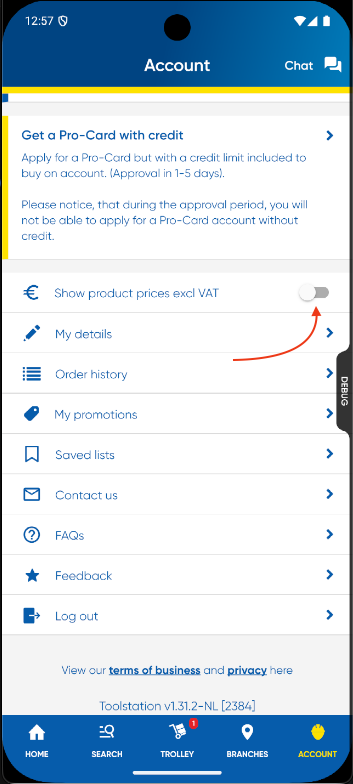
My Account Page → VAT Exclusive Price Toggle
5.2 Label:
- English: “Show product prices excl VAT”
- Dutch: “Toon de productprijzen excl BTW”
5.3 Behaviour:
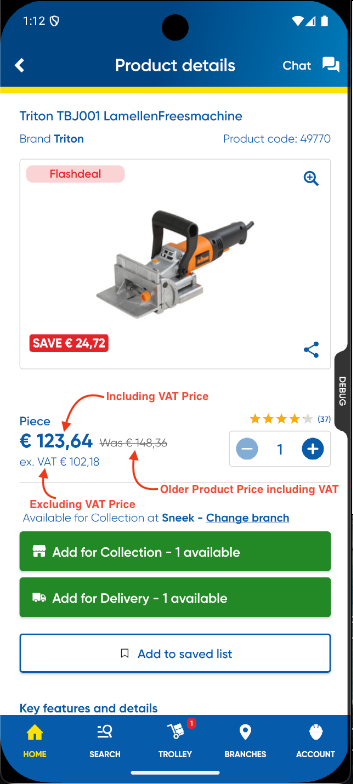
- Toggle OFF (default) → Inclusive VAT prominent
- Toggle ON → Exclusive VAT prominent
- The secondary price (net or gross) remains visible in smaller font / reduced emphasis
- There is also a WasPrice shown in the app to display the product’s older price. When the VAT toggle is off, the WasPrice is shown including VAT. When the toggle is on, the WasPrice is shown excluding VAT.
5.4 Guest users:
- Feature only appears after login, since Account page is behind authentication
6. State Management
The toggle value is:
- Stored in AppState (persistent across sessions)
- Backed by the ProductRepository stream:
ValueStream<bool> get exclusiveVatPricesStream
bool get isExclusiveVatPricesEnabled
- Resets only when user uninstalls + reinstalls the app
7. Global Price Updating via Streams
To ensure price updates are consistent across the entire app, relevant UI widgets subscribe to the isExclusiveVatPricesStream.
Whenever the user enables or disables the VAT toggle, this stream emits a new boolean value. Using a StreamBuilder, the UI listens to these updates and automatically rebuilds to reflect the correct price format.
productRepository.isExclusiveVatPricesStream
7.1 Example usage:
StreamBuilder<bool>(
  stream: exclusiveVatPricesStream,
  initialData: isExclusiveVatPricesEnabled,
  builder: (context, snapshot) {
    final isExclusiveVat = snapshot.data ?? false;

    return Wrap(
      crossAxisAlignment: WrapCrossAlignment.end,
      children: [
        Text(
          isExclusiveVat
              ? product.prices.formatted.net
              : product.prices.formatted.gross,
        ),
        // Was price logic
      ],
    );
  },
)
7.2 "Was Price" Handling
Using the WasPrice widget:
- Automatically chooses net or gross was-price
- Applies strike-through only when relevant
- Hides itself when invalid
8. Flow Diagram
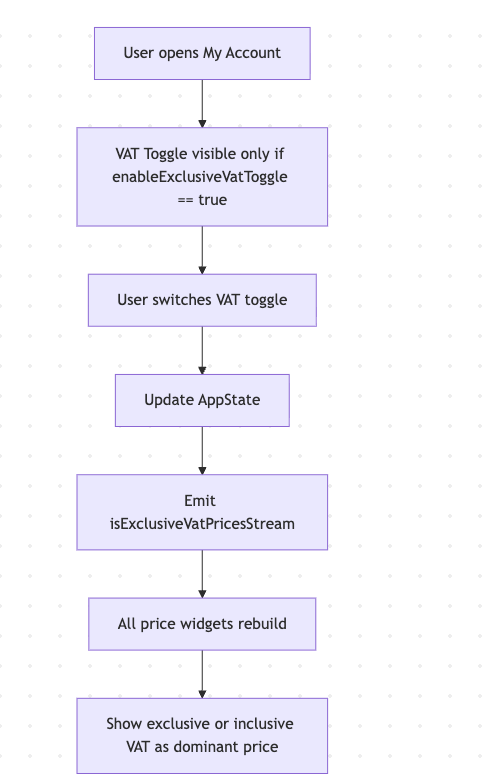
8.1 Mermaid Code
flowchart TD
    A[User opens My Account] --> B[VAT Toggle visible only if<br/> enableExclusiveVatToggle == true]
    B --> C[User switches VAT toggle]
    C --> D[Update AppState]
    D --> E[Emit isExclusiveVatPricesStream]
    E --> F[All price widgets rebuild]
    F --> G[Show exclusive or inclusive<br/> VAT as dominant price]
9. Acceptance Criteria
- VAT toggle appears in Account Page (EN & NL)
- Default behaviour → inclusive VAT is primary
- When toggle ON → exclusive VAT is primary
- Secondary price always displayed in smaller/less prominent styling
- Pricing updates globally across PDP, PLP, Trolley, Carousels, Saved Lists
- Toggle persists in AppState (survives app restarts)
- Resets only after app reinstall
FEATURE VIDEO: VAT Exclusive Price Toggle