

Contact Us Webview
Overview
In 2024, Contact us feature was updated to match the Toolstation UK website’s new Freshdesk Contact Form (MOB-3823). Now, the app can show:
The app decides which form to show based on a feature flag called hasContactUsWebView.
- The new Freshdesk WebView form, or
- The old in-app Flutter form (legacy)
How It Works
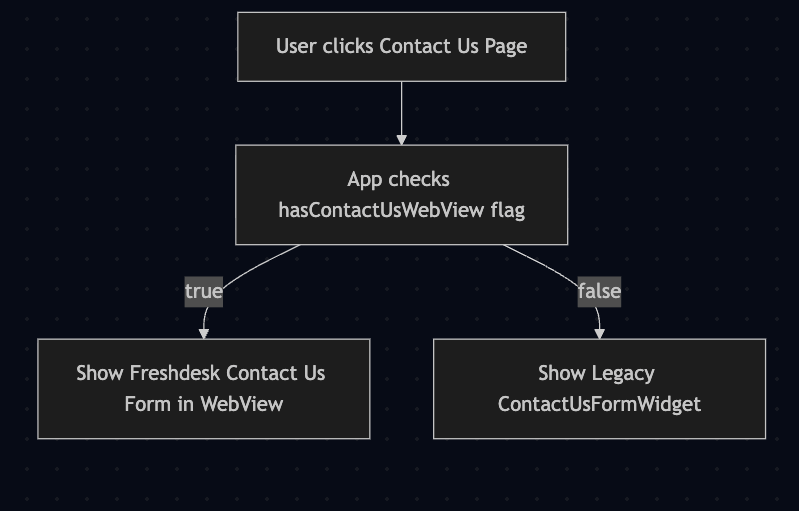
Mermaid Code
flowchart TD
    A[User clicks Contact Us Page] --> B[App checks<br>hasContactUsWebView flag]

    B -->|true| C[Show Freshdesk Contact Us<br>Form in WebView]
    B -->|false| D[Show Legacy<br>ContactUsFormWidget]
- When the user opens the Contact Us page:
- The app checks if the remoteConfig has enabled
hasContactUsWebView.
- The app checks if the remoteConfig has enabled
- If the flag is true → When user tap contact us the app shows the Freshdesk form (inside a WebView).
- If the flag is false → When user tap contact us the app shows the old Flutter Contact Us form.
This helps us switch between forms without releasing a new app build.
Main Components
1. ContactUsPage
File: lib/features/contact_us/contact_us_page.dart
This is the entry point of the Contact Us feature.
It checks the feature flag and decides which form to load:
if (hasContactUsWebView) {
  return const ContactUsWebView();
} else {
  return const ContactUsFormWidget();
}
- Uses FeatureMixin to get the feature flag value.
- Provides ContactUsPageBloc for handling the legacy form logic.
2. ContactUsWebView
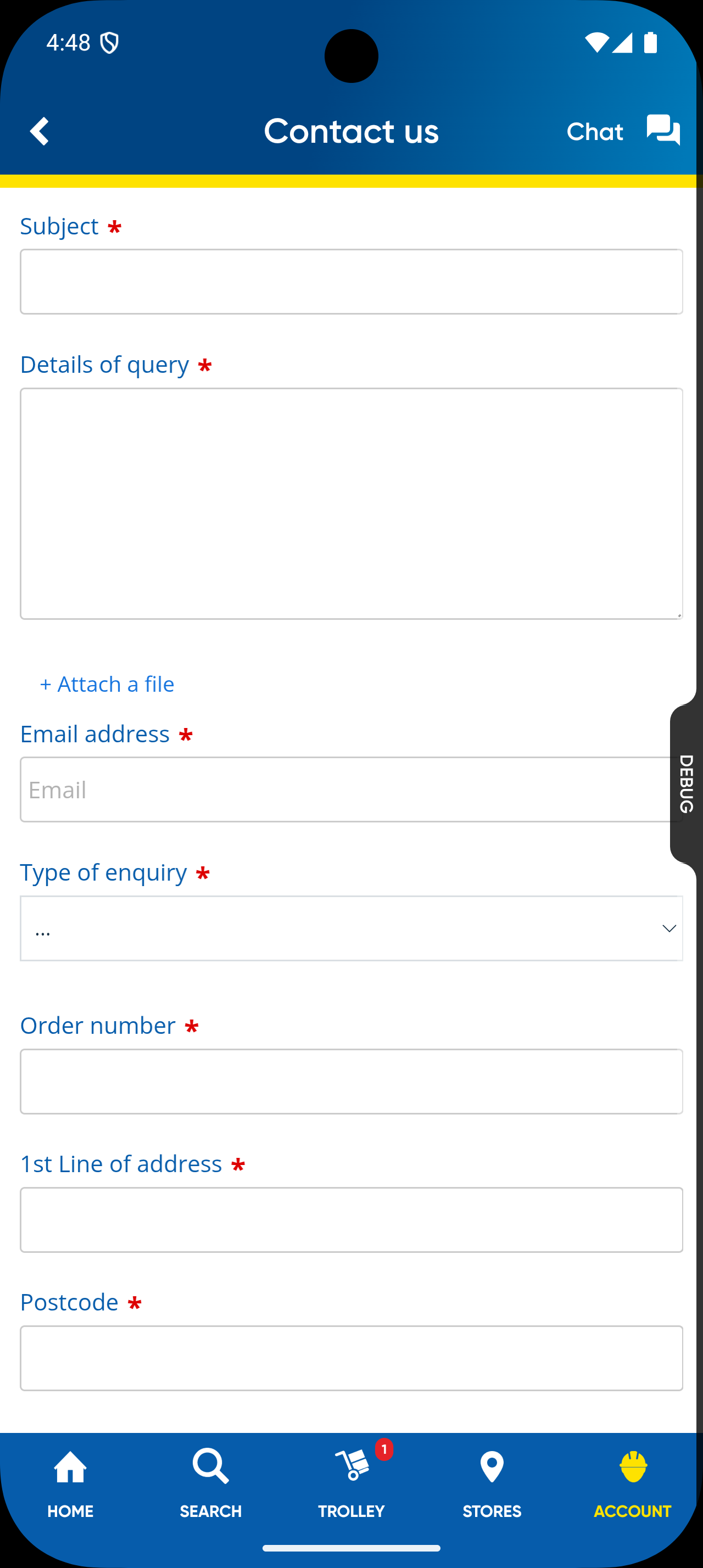
File: lib/features/contact_us/widgets/contact_us_webview.dart
This widget shows the new Freshdesk Contact Us form inside a WebView.
What It Does:
- Loads the Freshdesk form from AppConfig.contactUsUrl
- Supports file/image attachments
- Has validation support and shows error messages
- Logs any errors for debugging
- Works on both Android and iOS
Key Features:
| Function | Description |
|---|---|
| Loads URL | Opens Freshdesk form using WebViewController.loadRequest() |
| File Upload (Android) | Uses ImagePicker to allow users to upload images |
| File Upload (iOS) | Automatically supported by WebView |
| Error Handling | Uses LoggingService and shows a retry option |
| UI Feedback | Shows loading spinner, retry button, or error message |
Form Fields (Freshdesk WebView):
| Field | Required | Description |
|---|---|---|
| Subject | ✅ | User enters the subject of their reason for contact |
| Details of Query | ✅ | Explain the issue the user is facing |
| Attach File | ❌ | User can attach files and images |
| Email Address | ✅ | User's email address |
| Type of Inquiry | ✅ | User must choose an option from dropdown |
| Order Number | ✅ | Associated order number |
| 1st Line of Address | ✅ | First line of user's address |
| Postcode | ✅ | User's postcode |
3. ContactUsFormWidget
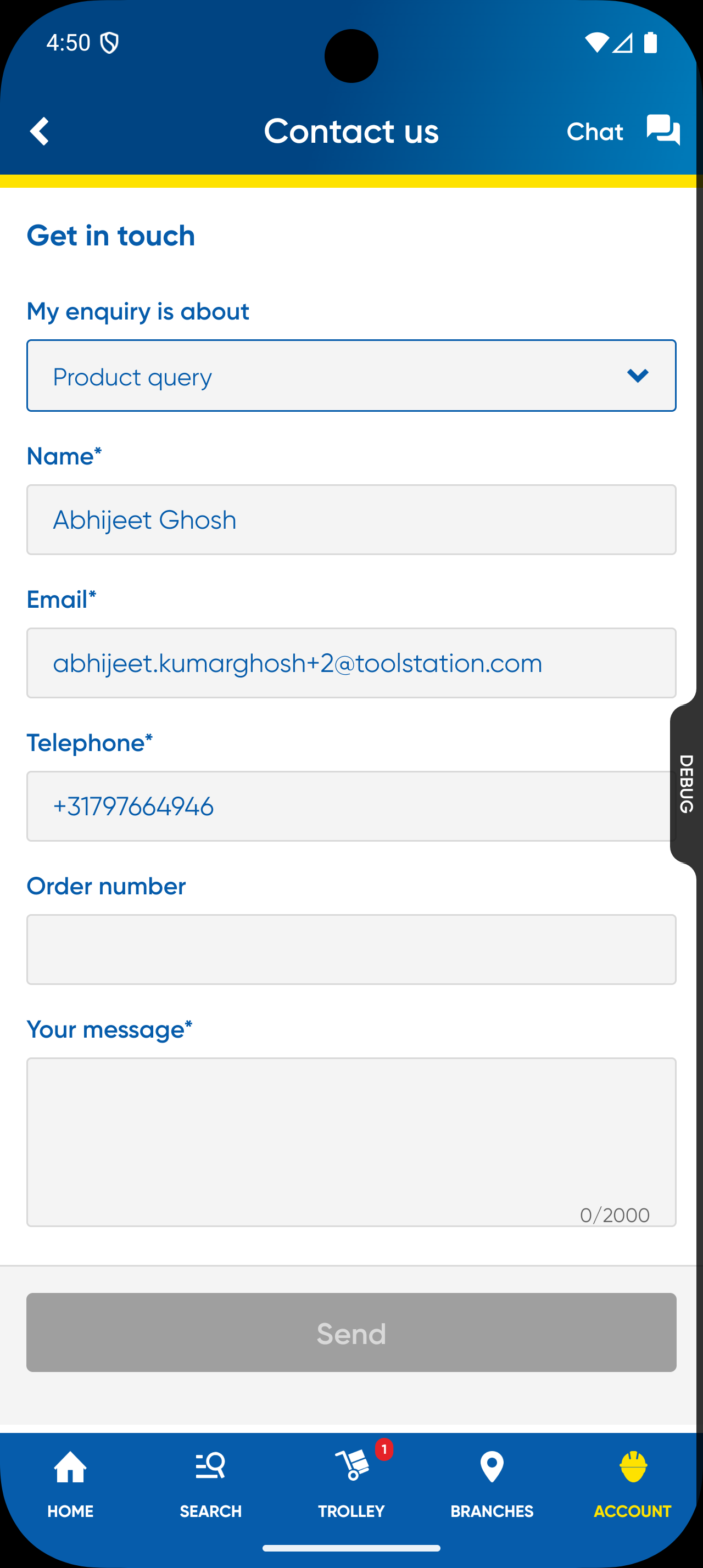
File: lib/features/contact_us/widgets/contact_us_form.dart
This is the old in-app form still used in some regions or when the feature flag is off.
What It Does:
- Shows Flutter form fields for user to fill
- Validates inputs before submission
- Sends enquiry through app’s backend
- Shows success or error messages
Form Fields:
| Field | Required | Description |
|---|---|---|
| Name | ✅ | Auto-filled if user is logged in |
| ✅ | Must be a valid email | |
| Telephone | ✅ | Max 16 characters |
| Order Number | ❌ | Optional |
| Message | ✅ | Max 2000 characters |
How It Works:
- Managed by ContactUsPageBloc
- On submit:
- Validates input
- Sends data to backend
- Shows confirmation message
App Configuration and Feature Flag
App Config (app_config.dart)
contactUsUrl: 'https://toolstation.freshdesk.com/support/tickets/new'
This URL is where the Freshdesk form is hosted. The WebView uses this to load the form.
Feature Flag
| Name | Type | Description |
|---|---|---|
| hasContactUsWebView | bool | Controls which form to show |
Behavior:
- True → Show Freshdesk WebView form
- False → Show old Flutter form
Regional Behavior
| Region | Form Type | Description |
|---|---|---|
| UK | Freshdesk WebView | Show freshchart contact us webview |
| BE | Legacy Flutter Form | Appside Contact us form widget |
| NL | Legacy Flutter Form | Appside Contact us form widget |
Feature Video: ContactUs Webview Feature Video